
Build an Environmental Monitoring Dashboard with CrowPanel 2.4"-ESP32 HMI 320×240 SPI TFT Touch Screen
This tutorial shows how to build an Environmental Monitoring Dashboard using the CrowPanel 2.4"-ESP32 HMI 320×240 SPI TFT LCD Touch Screen, LVGL, DHT11 temperature and humidity sensor, LED or relay control, and Bluetooth Serial monitoring.
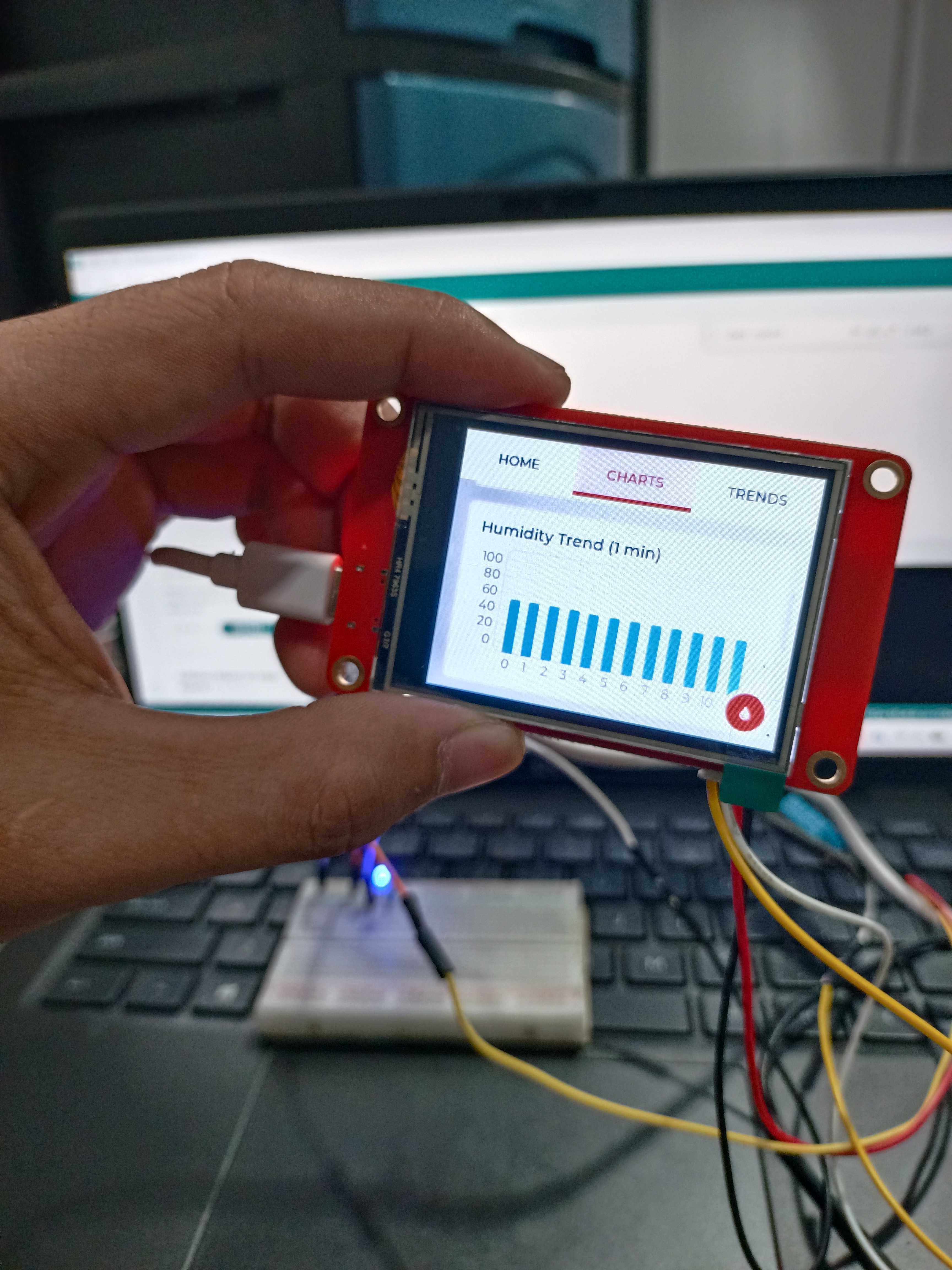
CrowPanel ESP32 LVGL dashboard design preview.
Overview
This project displays real-time temperature and humidity readings from the DHT11 sensor on a touchscreen LVGL dashboard. It also includes real-time charts, a bulb or LED ON/OFF control button, and Bluetooth Serial monitoring for viewing sensor data wirelessly.
Project Use Case
This project is useful for basic environmental monitoring, classroom IoT demonstrations, touchscreen dashboard projects, and simple control panel applications where live sensor values and simple output control are needed.
Hardware and Software Components
The project uses the CrowPanel 2.4" ESP32 HMI display as the main controller and user interface, a DHT11 sensor for environmental readings, and an LED or relay module for output control.
Hardware Components
- CrowPanel 2.4"-ESP32 HMI 320×240 SPI TFT LCD Touch Screen
- DHT11 Temperature and Humidity Sensor
- LED or relay module for bulb control
- Jumper wires
- USB cable for programming
- Computer or laptop for uploading the Arduino project
Software Tools
- Arduino IDE 2.3.7
- ESP32 Board Package by Espressif Systems version 2.0.17
- LVGL Library version 8.3.11
- TFT_eSPI Library version 2.5.43
- DHT Sensor Library
- Adafruit Unified Sensor Library
- Bluetooth Serial Library
Project Files
- Arduino project source files
- Modified LVGL UI file
- TFT_eSPI replacement configuration files
- Modified lv_demo_widgets.c file
- Project repository/source files
Application Discussion
The CrowPanel 2.4"-ESP32 HMI 320×240 SPI TFT LCD Touch Screen is an ESP32-based display module with an integrated SPI TFT display and resistive touchscreen. Since the display and ESP32 controller are integrated into one device, it is suitable for compact dashboard and control interface projects.
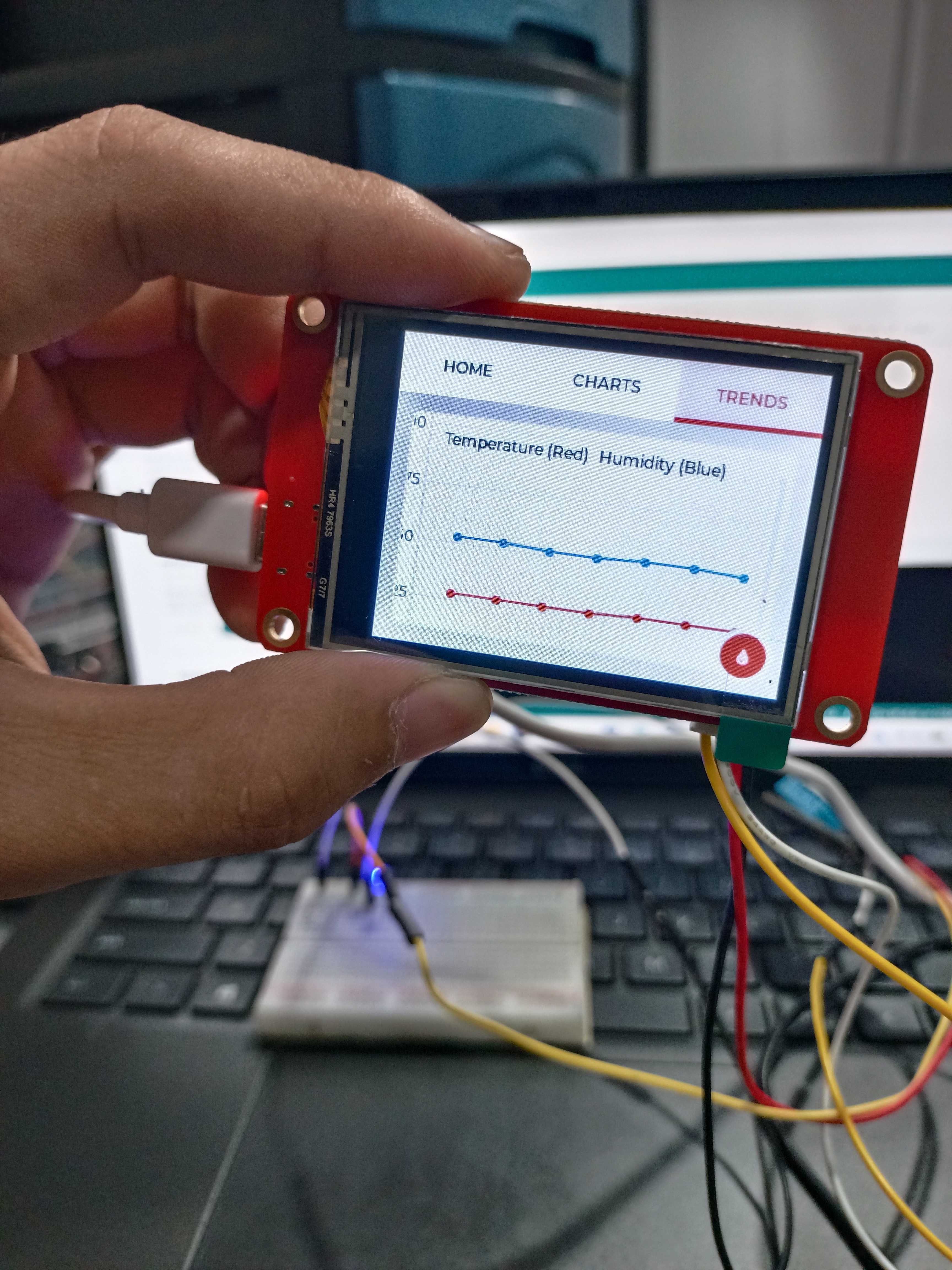
CrowPanel ESP32 LVGL dashboard design preview.
CrowPanel 2.4" ESP32 HMI
The CrowPanel serves as the main controller, screen, and touchscreen input device. It displays the dashboard interface and handles user interaction through the touch panel.
DHT11 Sensor
The DHT11 sensor measures temperature and humidity. These values are displayed on the LVGL dashboard through gauges, charts, labels, and indicators.
Bluetooth Serial
Bluetooth Serial allows the ESP32 to send live sensor readings wirelessly to a Bluetooth terminal app using the device name CrowPanel_Control.
LVGL and TFT_eSPI
LVGL is used to create the graphical dashboard interface. It provides ready-to-use widgets such as buttons, charts, labels, gauges, and panels. TFT_eSPI is used to drive the SPI TFT display using the correct screen, touch, and pin configuration for the CrowPanel.
Set-up the Hardware
A schematic or system diagram is applicable because the DHT11 sensor and LED or relay signal are connected externally to the CrowPanel ESP32 board.
CrowPanel 2.4" ESP32 HMI
Integrated ESP32 controller, 320×240 SPI TFT LCD, resistive touchscreen, USB programming connection, and GPIO access.
External Components
DHT11 sensor connected to GPIO 32 for temperature and humidity readings. LED or relay signal connected to GPIO 25 for output control.
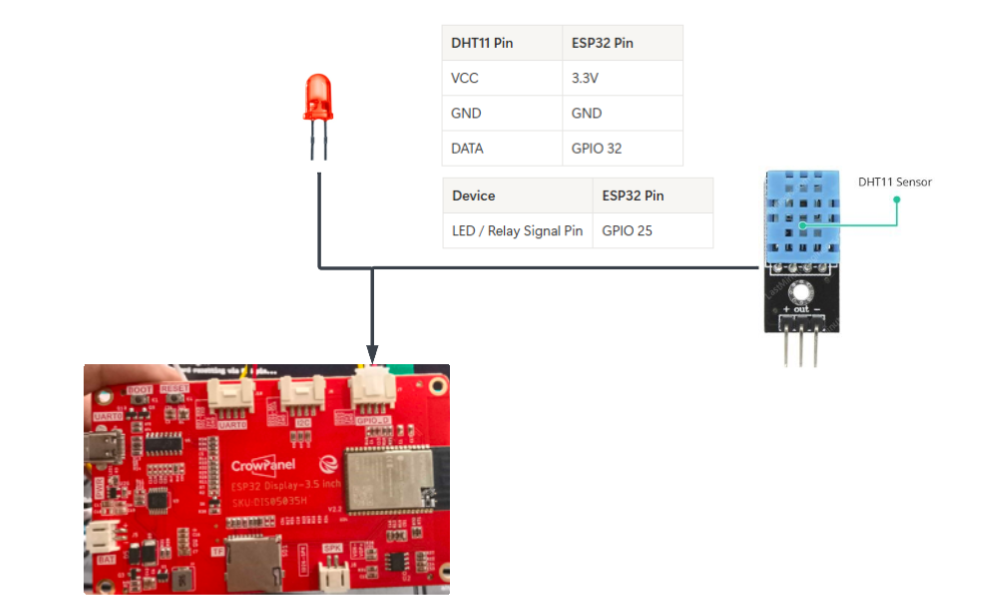
Environmental monitoring hardware setup preview.
Assembly Instructions
Connect Sensor Power
Connect the DHT11 VCC pin to the 3.3V pin of the ESP32.
Connect Sensor Ground
Connect the DHT11 GND pin to the GND pin of the ESP32.
Connect Sensor Data
Connect the DHT11 DATA pin to GPIO 32.
Connect Output Control
Connect the LED or relay signal pin to GPIO 25. Use a low-voltage LED for safer testing.
Connect the CrowPanel
Connect the CrowPanel 2.4"-ESP32 HMI 320×240 SPI TFT LCD Touch Screen to the computer using a USB cable.
Upload the Project
Upload the Arduino sketch using the correct board settings. After uploading, the LVGL environmental monitoring dashboard should appear on the display.
Set-up the Software
Before continuing, download or clone the project repository first. The repository contains the required Arduino code, modified LVGL UI file, and configuration files used in this tutorial.
github.com/createlabz/crowpanel-2.4-esp32-hmi-320x240-spi-tft-touch-lvgl-dashboard
Download the Repository
Open the repository, click the Code button, select Download ZIP, and extract the ZIP file on your computer.
Open the Arduino Project
Open the Arduino project file from the extracted repository using Arduino IDE.
Tested Software Versions and Board Settings
Required Libraries
Install LVGL, TFT_eSPI, DHT Sensor Library, and Adafruit Unified Sensor using the Arduino IDE Library Manager. The LVGL library used in this project can be downloaded from github.com/createlabz/lvgl.
Documents/Arduino/libraries/lvglUpload the Project
After installing the required libraries and replacing the TFT_eSPI and LVGL UI files, open the project in Arduino IDE and upload it to the CrowPanel board.
Open the .ino File
Open the project .ino file in Arduino IDE.
Select Board and Port
Select ESP32 Dev Module as the board and choose the correct COM port.
Confirm Files and Libraries
Check that the required libraries are installed and confirm that the TFT_eSPI and LVGL UI files were replaced correctly.
Upload and Run
Click Upload. After uploading, the LVGL dashboard should start automatically.
Code
Paste the complete working Arduino code inside the code block below. This program initializes the CrowPanel display, LVGL interface, DHT11 sensor, Bluetooth Serial monitoring, and LED or relay output control.
#define LV_CONF_INCLUDE_SIMPLE

#include
#include
#include "esp_heap_caps.h"

/* ===== BLUETOOTH SERIAL ===== */
#include "BluetoothSerial.h"
BluetoothSerial SerialBT;

/* ===== DHT SENSOR ===== */
#include

#define DHTPIN 32
#define DHTTYPE DHT11
DHT dht(DHTPIN, DHTTYPE);

/* Global sensor values for LVGL */
float g_temperature = 0;
float g_humidity = 0;

extern "C" {
  #include
}

TFT_eSPI tft = TFT_eSPI();

/* ================= Screen Settings ================= */
static const uint16_t screenWidth  = 320;
static const uint16_t screenHeight = 240;

/* ================= LVGL Buffer ================= */
static lv_disp_draw_buf_t draw_buf;
static lv_color_t buf1[screenWidth * 20];

/* ================= LVGL Tick Timer ================= */
hw_timer_t * lv_timer = NULL;

void IRAM_ATTR onTimer() {
  lv_tick_inc(1);
}

/* ================= Display Flush ================= */
void my_disp_flush(lv_disp_drv_t *disp,
                   const lv_area_t *area,
                   lv_color_t *color_p)
{
  uint32_t w = area->x2 - area->x1 + 1;
  uint32_t h = area->y2 - area->y1 + 1;

  tft.startWrite();
  tft.setAddrWindow(area->x1, area->y1, w, h);
  tft.pushColors((uint16_t *)color_p, w * h, true);
  tft.endWrite();

  lv_disp_flush_ready(disp);
}

/* ================= Touch Read ================= */
void my_touchpad_read(lv_indev_drv_t *indev_driver,
                      lv_indev_data_t *data)
{
  uint16_t x, y;

  if (tft.getTouch(&x, &y, 40))
  {
    data->state = LV_INDEV_STATE_PR;
  data->point.x = screenWidth - x;
data->point.y = y;
  }
  else
  {
    data->state = LV_INDEV_STATE_REL;
  }
}

/* ================= Setup ================= */
void setup()
{
  Serial.begin(115200);

  /* Backlight pin */
  pinMode(27, OUTPUT);
  digitalWrite(27, HIGH);

  /* Start Bluetooth Serial */
  SerialBT.begin("CrowPanel_Control");
  Serial.println("Bluetooth Serial started");

  /* Start DHT sensor */
  dht.begin();

  tft.init();
  tft.setRotation(3);
  tft.setSwapBytes(true);

  uint16_t calData[5] = { 292, 3607, 302, 3486, 7 };
  tft.setTouch(calData);

  /* Display test */
  tft.fillScreen(TFT_RED);
  delay(500);
  tft.fillScreen(TFT_GREEN);
  delay(500);
  tft.fillScreen(TFT_BLUE);
  delay(500);
  tft.fillScreen(TFT_BLACK);

  /* Initialize LVGL */
  lv_init();

  lv_disp_draw_buf_init(&draw_buf, buf1, NULL,
                        screenWidth * 20);

  /* 1ms LVGL tick timer */
  lv_timer = timerBegin(0, 80, true);
  timerAttachInterrupt(lv_timer, &onTimer, true);
  timerAlarmWrite(lv_timer, 1000, true);
  timerAlarmEnable(lv_timer);

  /* Register display */
  static lv_disp_drv_t disp_drv;
  lv_disp_drv_init(&disp_drv);
  disp_drv.hor_res = screenWidth;
  disp_drv.ver_res = screenHeight;
  disp_drv.flush_cb = my_disp_flush;
  disp_drv.draw_buf = &draw_buf;
  lv_disp_drv_register(&disp_drv);

  /* Register touch */
  static lv_indev_drv_t indev_drv;
  lv_indev_drv_init(&indev_drv);
  indev_drv.type = LV_INDEV_TYPE_POINTER;
  indev_drv.read_cb = my_touchpad_read;
  lv_indev_drv_register(&indev_drv);

  /* Load LVGL demo */
  lv_demo_widgets();
}

/* ================= Loop ================= */
void loop()
{
  lv_timer_handler();
  delay(5);

  /* ===== Read DHT11 every ~2 seconds ===== */
  static unsigned long lastRead = 0;

  if (millis() - lastRead > 2000) {

    float t = dht.readTemperature();
    float h = dht.readHumidity();

    if (!isnan(t) && !isnan(h)) {

      g_temperature = t;
      g_humidity = h;

      Serial.print("Temp: ");
      Serial.print(t);
      Serial.print("  Hum: ");
      Serial.println(h);

      SerialBT.print("Temp:");
      SerialBT.print(t);
      SerialBT.print("C  Hum:");
      SerialBT.print(h);
      SerialBT.println("%");
    }

    lastRead = millis();
  }

  /* ===== Bluetooth command handler ===== */
  if (SerialBT.available()) {

    String cmd = SerialBT.readStringUntil('\n');
    cmd.trim();

    Serial.print("Received: ");
    Serial.println(cmd);

    if (cmd == "ON") {
      digitalWrite(27, HIGH);
      SerialBT.println("Screen ON");
    }

    if (cmd == "OFF") {
      digitalWrite(27, LOW);
      SerialBT.println("Screen OFF");
    }
  }
}
// //                            USER DEFINED SETTINGS
// //   Set driver type, fonts to be loaded, pins used and SPI control method etc.
// //
// //   See the User_Setup_Select.h file if you wish to be able to define multiple
// //   setups and then easily select which setup file is used by the compiler.
// //
// //   If this file is edited correctly then all the library example sketches should
// //   run without the need to make any more changes for a particular hardware setup!
// //   Note that some sketches are designed for a particular TFT pixel width/height

// // User defined information reported by "Read_User_Setup" test & diagnostics example
// #define USER_SETUP_INFO "User_Setup"

// // Define to disable all #warnings in library (can be put in User_Setup_Select.h)
// //#define DISABLE_ALL_LIBRARY_WARNINGS

// // ##################################################################################
// //
// // Section 1. Call up the right driver file and any options for it
// //
// // ##################################################################################

// // Define STM32 to invoke optimised processor support (only for STM32)
// //#define STM32

// // Defining the STM32 board allows the library to optimise the performance
// // for UNO compatible "MCUfriend" style shields
// //#define NUCLEO_64_TFT
// //#define NUCLEO_144_TFT

// // STM32 8-bit parallel only:
// // If STN32 Port A or B pins 0-7 are used for 8-bit parallel data bus bits 0-7
// // then this will improve rendering performance by a factor of ~8x
// //#define STM_PORTA_DATA_BUS
// //#define STM_PORTB_DATA_BUS

// // Tell the library to use parallel mode (otherwise SPI is assumed)
// //#define TFT_PARALLEL_8_BIT
// //#defined TFT_PARALLEL_16_BIT // **** 16-bit parallel ONLY for RP2040 processor ****

// // Display type -  only define if RPi display
// //#define RPI_DISPLAY_TYPE // 20MHz maximum SPI

// // Only define one driver, the other ones must be commented out
// #define ILI9341_DRIVER       // Generic driver for common displays
// //#define ILI9341_2_DRIVER     // Alternative ILI9341 driver, see https://github.com/Bodmer/TFT_eSPI/issues/1172
// //#define ST7735_DRIVER      // Define additional parameters below for this display
// //#define ILI9163_DRIVER     // Define additional parameters below for this display
// //#define S6D02A1_DRIVER
// //#define RPI_ILI9486_DRIVER // 20MHz maximum SPI
// //#define HX8357D_DRIVER
// //#define ILI9481_DRIVER
// //#define ILI9486_DRIVER
// //#define ILI9488_DRIVER     // WARNING: Do not connect ILI9488 display SDO to MISO if other devices share the SPI bus (TFT SDO does NOT tristate when CS is high)
// //#define ST7789_DRIVER      // Full configuration option, define additional parameters below for this display
// //#define ST7789_2_DRIVER    // Minimal configuration option, define additional parameters below for this display
// //#define R61581_DRIVER
// //#define RM68140_DRIVER
// //#define ST7796_DRIVER
// //#define SSD1351_DRIVER
// //#define SSD1963_480_DRIVER
// //#define SSD1963_800_DRIVER
// //#define SSD1963_800ALT_DRIVER
// //#define ILI9225_DRIVER
// //#define GC9A01_DRIVER

// // Some displays support SPI reads via the MISO pin, other displays have a single
// // bi-directional SDA pin and the library will try to read this via the MOSI line.
// // To use the SDA line for reading data from the TFT uncomment the following line:

// // #define TFT_SDA_READ      // This option is for ESP32 ONLY, tested with ST7789 and GC9A01 display only

// // For ST7735, ST7789 and ILI9341 ONLY, define the colour order IF the blue and red are swapped on your display
// // Try ONE option at a time to find the correct colour order for your display

// //  #define TFT_RGB_ORDER TFT_RGB  // Colour order Red-Green-Blue
// //  #define TFT_RGB_ORDER TFT_BGR  // Colour order Blue-Green-Red

// // For M5Stack ESP32 module with integrated ILI9341 display ONLY, remove // in line below

// // #define M5STACK

// // For ST7789, ST7735, ILI9163 and GC9A01 ONLY, define the pixel width and height in portrait orientation
// // #define TFT_WIDTH  80
// // #define TFT_WIDTH  128
// // #define TFT_WIDTH  172 // ST7789 172 x 320
// // #define TFT_WIDTH  170 // ST7789 170 x 320
// // #define TFT_WIDTH  240 // ST7789 240 x 240 and 240 x 320
// // #define TFT_HEIGHT 160
// // #define TFT_HEIGHT 128
// // #define TFT_HEIGHT 240 // ST7789 240 x 240
// // #define TFT_HEIGHT 320 // ST7789 240 x 320
// // #define TFT_HEIGHT 240 // GC9A01 240 x 240

// // For ST7735 ONLY, define the type of display, originally this was based on the
// // colour of the tab on the screen protector film but this is not always true, so try
// // out the different options below if the screen does not display graphics correctly,
// // e.g. colours wrong, mirror images, or stray pixels at the edges.
// // Comment out ALL BUT ONE of these options for a ST7735 display driver, save this
// // this User_Setup file, then rebuild and upload the sketch to the board again:

// // #define ST7735_INITB
// // #define ST7735_GREENTAB
// // #define ST7735_GREENTAB2
// // #define ST7735_GREENTAB3
// // #define ST7735_GREENTAB128    // For 128 x 128 display
// // #define ST7735_GREENTAB160x80 // For 160 x 80 display (BGR, inverted, 26 offset)
// // #define ST7735_ROBOTLCD       // For some RobotLCD Arduino shields (128x160, BGR, https://docs.arduino.cc/retired/getting-started-guides/TFT)
// // #define ST7735_REDTAB
// // #define ST7735_BLACKTAB
// // #define ST7735_REDTAB160x80   // For 160 x 80 display with 24 pixel offset

// // If colours are inverted (white shows as black) then uncomment one of the next
// // 2 lines try both options, one of the options should correct the inversion.

// // #define TFT_INVERSION_ON
// // #define TFT_INVERSION_OFF


// // ##################################################################################
// //
// // Section 2. Define the pins that are used to interface with the display here
// //
// // ##################################################################################

// // If a backlight control signal is available then define the TFT_BL pin in Section 2
// // below. The backlight will be turned ON when tft.begin() is called, but the library
// // needs to know if the LEDs are ON with the pin HIGH or LOW. If the LEDs are to be
// // driven with a PWM signal or turned OFF/ON then this must be handled by the user
// // sketch. e.g. with digitalWrite(TFT_BL, LOW);

// // #define TFT_BL   32            // LED back-light control pin
// // #define TFT_BACKLIGHT_ON HIGH  // Level to turn ON back-light (HIGH or LOW)


// // We must use hardware SPI, a minimum of 3 GPIO pins is needed.
// // Typical setup for ESP8266 NodeMCU ESP-12 is :
// //
// // Display SDO/MISO  to NodeMCU pin D6 (or leave disconnected if not reading TFT)
// // Display LED       to NodeMCU pin VIN (or 5V, see below)
// // Display SCK       to NodeMCU pin D5
// // Display SDI/MOSI  to NodeMCU pin D7
// // Display DC (RS/AO)to NodeMCU pin D3
// // Display RESET     to NodeMCU pin D4 (or RST, see below)
// // Display CS        to NodeMCU pin D8 (or GND, see below)
// // Display GND       to NodeMCU pin GND (0V)
// // Display VCC       to NodeMCU 5V or 3.3V
// //
// // The TFT RESET pin can be connected to the NodeMCU RST pin or 3.3V to free up a control pin
// //
// // The DC (Data Command) pin may be labelled AO or RS (Register Select)
// //
// // With some displays such as the ILI9341 the TFT CS pin can be connected to GND if no more
// // SPI devices (e.g. an SD Card) are connected, in this case comment out the #define TFT_CS
// // line below so it is NOT defined. Other displays such at the ST7735 require the TFT CS pin
// // to be toggled during setup, so in these cases the TFT_CS line must be defined and connected.
// //
// // The NodeMCU D0 pin can be used for RST
// //
// //
// // Note: only some versions of the NodeMCU provide the USB 5V on the VIN pin
// // If 5V is not available at a pin you can use 3.3V but backlight brightness
// // will be lower.


// // ###### EDIT THE PIN NUMBERS IN THE LINES FOLLOWING TO SUIT YOUR ESP8266 SETUP ######

// // For NodeMCU - use pin numbers in the form PIN_Dx where Dx is the NodeMCU pin designation
// #define TFT_MISO  PIN_D6  // Automatically assigned with ESP8266 if not defined
// #define TFT_MOSI  PIN_D7  // Automatically assigned with ESP8266 if not defined
// #define TFT_SCLK  PIN_D5  // Automatically assigned with ESP8266 if not defined

// #define TFT_CS    PIN_D8  // Chip select control pin D8
// #define TFT_DC    PIN_D3  // Data Command control pin
// #define TFT_RST   PIN_D4  // Reset pin (could connect to NodeMCU RST, see next line)
// //#define TFT_RST  -1     // Set TFT_RST to -1 if the display RESET is connected to NodeMCU RST or 3.3V


// //#define TFT_BL PIN_D1  // LED back-light (only for ST7789 with backlight control pin)

// //#define TOUCH_CS PIN_D2     // Chip select pin (T_CS) of touch screen

// //#define TFT_WR PIN_D2       // Write strobe for modified Raspberry Pi TFT only


// // ######  FOR ESP8266 OVERLAP MODE EDIT THE PIN NUMBERS IN THE FOLLOWING LINES  ######

// // Overlap mode shares the ESP8266 FLASH SPI bus with the TFT so has a performance impact
// // but saves pins for other functions. It is best not to connect MISO as some displays
// // do not tristate that line when chip select is high!
// // Note: Only one SPI device can share the FLASH SPI lines, so a SPI touch controller
// // cannot be connected as well to the same SPI signals.
// // On NodeMCU 1.0 SD0=MISO, SD1=MOSI, CLK=SCLK to connect to TFT in overlap mode
// // On NodeMCU V3  S0 =MISO, S1 =MOSI, S2 =SCLK
// // In ESP8266 overlap mode the following must be defined

// //#define TFT_SPI_OVERLAP

// // In ESP8266 overlap mode the TFT chip select MUST connect to pin D3
// //#define TFT_CS   PIN_D3
// //#define TFT_DC   PIN_D5  // Data Command control pin
// //#define TFT_RST  PIN_D4  // Reset pin (could connect to NodeMCU RST, see next line)
// //#define TFT_RST  -1  // Set TFT_RST to -1 if the display RESET is connected to NodeMCU RST or 3.3V


// // ###### EDIT THE PIN NUMBERS IN THE LINES FOLLOWING TO SUIT YOUR ESP32 SETUP   ######

// // For ESP32 Dev board (only tested with ILI9341 display)
// // The hardware SPI can be mapped to any pins

// //#define TFT_MISO 19
// //#define TFT_MOSI 23
// //#define TFT_SCLK 18
// //#define TFT_CS   15  // Chip select control pin
// //#define TFT_DC    2  // Data Command control pin
// //#define TFT_RST   4  // Reset pin (could connect to RST pin)
// //#define TFT_RST  -1  // Set TFT_RST to -1 if display RESET is connected to ESP32 board RST

// // For ESP32 Dev board (only tested with GC9A01 display)
// // The hardware SPI can be mapped to any pins

// //#define TFT_MOSI 15 // In some display driver board, it might be written as "SDA" and so on.
// //#define TFT_SCLK 14
// //#define TFT_CS   5  // Chip select control pin
// //#define TFT_DC   27  // Data Command control pin
// //#define TFT_RST  33  // Reset pin (could connect to Arduino RESET pin)
// //#define TFT_BL   22  // LED back-light

// //#define TOUCH_CS 21     // Chip select pin (T_CS) of touch screen

// //#define TFT_WR 22    // Write strobe for modified Raspberry Pi TFT only

// // For the M5Stack module use these #define lines
// //#define TFT_MISO 19
// //#define TFT_MOSI 23
// //#define TFT_SCLK 18
// //#define TFT_CS   14  // Chip select control pin
// //#define TFT_DC   27  // Data Command control pin
// //#define TFT_RST  33  // Reset pin (could connect to Arduino RESET pin)
// //#define TFT_BL   32  // LED back-light (required for M5Stack)

// // ######       EDIT THE PINs BELOW TO SUIT YOUR ESP32 PARALLEL TFT SETUP        ######

// // The library supports 8-bit parallel TFTs with the ESP32, the pin
// // selection below is compatible with ESP32 boards in UNO format.
// // Wemos D32 boards need to be modified, see diagram in Tools folder.
// // Only ILI9481 and ILI9341 based displays have been tested!

// // Parallel bus is only supported for the STM32 and ESP32
// // Example below is for ESP32 Parallel interface with UNO displays

// // Tell the library to use 8-bit parallel mode (otherwise SPI is assumed)
// //#define TFT_PARALLEL_8_BIT

// // The ESP32 and TFT the pins used for testing are:
// //#define TFT_CS   33  // Chip select control pin (library pulls permanently low
// //#define TFT_DC   15  // Data Command control pin - must use a pin in the range 0-31
// //#define TFT_RST  32  // Reset pin, toggles on startup

// //#define TFT_WR    4  // Write strobe control pin - must use a pin in the range 0-31
// //#define TFT_RD    2  // Read strobe control pin

// //#define TFT_D0   12  // Must use pins in the range 0-31 for the data bus
// //#define TFT_D1   13  // so a single register write sets/clears all bits.
// //#define TFT_D2   26  // Pins can be randomly assigned, this does not affect
// //#define TFT_D3   25  // TFT screen update performance.
// //#define TFT_D4   17
// //#define TFT_D5   16
// //#define TFT_D6   27
// //#define TFT_D7   14

// // ######       EDIT THE PINs BELOW TO SUIT YOUR STM32 SPI TFT SETUP        ######

// // The TFT can be connected to SPI port 1 or 2
// //#define TFT_SPI_PORT 1 // SPI port 1 maximum clock rate is 55MHz
// //#define TFT_MOSI PA7
// //#define TFT_MISO PA6
// //#define TFT_SCLK PA5

// //#define TFT_SPI_PORT 2 // SPI port 2 maximum clock rate is 27MHz
// //#define TFT_MOSI PB15
// //#define TFT_MISO PB14
// //#define TFT_SCLK PB13

// // Can use Ardiuno pin references, arbitrary allocation, TFT_eSPI controls chip select
// //#define TFT_CS   D5 // Chip select control pin to TFT CS
// //#define TFT_DC   D6 // Data Command control pin to TFT DC (may be labelled RS = Register Select)
// //#define TFT_RST  D7 // Reset pin to TFT RST (or RESET)
// // OR alternatively, we can use STM32 port reference names PXnn
// //#define TFT_CS   PE11 // Nucleo-F767ZI equivalent of D5
// //#define TFT_DC   PE9  // Nucleo-F767ZI equivalent of D6
// //#define TFT_RST  PF13 // Nucleo-F767ZI equivalent of D7

// //#define TFT_RST  -1   // Set TFT_RST to -1 if the display RESET is connected to processor reset
//                         // Use an Arduino pin for initial testing as connecting to processor reset
//                         // may not work (pulse too short at power up?)

// // ##################################################################################
// //
// // Section 3. Define the fonts that are to be used here
// //
// // ##################################################################################

// // Comment out the #defines below with // to stop that font being loaded
// // The ESP8366 and ESP32 have plenty of memory so commenting out fonts is not
// // normally necessary. If all fonts are loaded the extra FLASH space required is
// // about 17Kbytes. To save FLASH space only enable the fonts you need!

// #define LOAD_GLCD   // Font 1. Original Adafruit 8 pixel font needs ~1820 bytes in FLASH
// #define LOAD_FONT2  // Font 2. Small 16 pixel high font, needs ~3534 bytes in FLASH, 96 characters
// #define LOAD_FONT4  // Font 4. Medium 26 pixel high font, needs ~5848 bytes in FLASH, 96 characters
// #define LOAD_FONT6  // Font 6. Large 48 pixel font, needs ~2666 bytes in FLASH, only characters 1234567890:-.apm
// #define LOAD_FONT7  // Font 7. 7 segment 48 pixel font, needs ~2438 bytes in FLASH, only characters 1234567890:-.
// #define LOAD_FONT8  // Font 8. Large 75 pixel font needs ~3256 bytes in FLASH, only characters 1234567890:-.
// //#define LOAD_FONT8N // Font 8. Alternative to Font 8 above, slightly narrower, so 3 digits fit a 160 pixel TFT
// #define LOAD_GFXFF  // FreeFonts. Include access to the 48 Adafruit_GFX free fonts FF1 to FF48 and custom fonts

// // Comment out the #define below to stop the SPIFFS filing system and smooth font code being loaded
// // this will save ~20kbytes of FLASH
// #define SMOOTH_FONT


// // ##################################################################################
// //
// // Section 4. Other options
// //
// // ##################################################################################

// // For RP2040 processor and SPI displays, uncomment the following line to use the PIO interface.
// //#define RP2040_PIO_SPI // Leave commented out to use standard RP2040 SPI port interface

// // For RP2040 processor and 8 or 16-bit parallel displays:
// // The parallel interface write cycle period is derived from a division of the CPU clock
// // speed so scales with the processor clock. This means that the divider ratio may need
// // to be increased when overclocking. It may also need to be adjusted dependant on the
// // display controller type (ILI94341, HX8357C etc.). If RP2040_PIO_CLK_DIV is not defined
// // the library will set default values which may not suit your display.
// // The display controller data sheet will specify the minimum write cycle period. The
// // controllers often work reliably for shorter periods, however if the period is too short
// // the display may not initialise or graphics will become corrupted.
// // PIO write cycle frequency = (CPU clock/(4 * RP2040_PIO_CLK_DIV))
// //#define RP2040_PIO_CLK_DIV 1 // 32ns write cycle at 125MHz CPU clock
// //#define RP2040_PIO_CLK_DIV 2 // 64ns write cycle at 125MHz CPU clock
// //#define RP2040_PIO_CLK_DIV 3 // 96ns write cycle at 125MHz CPU clock

// // For the RP2040 processor define the SPI port channel used (default 0 if undefined)
// //#define TFT_SPI_PORT 1 // Set to 0 if SPI0 pins are used, or 1 if spi1 pins used

// // For the STM32 processor define the SPI port channel used (default 1 if undefined)
// //#define TFT_SPI_PORT 2 // Set to 1 for SPI port 1, or 2 for SPI port 2

// // Define the SPI clock frequency, this affects the graphics rendering speed. Too
// // fast and the TFT driver will not keep up and display corruption appears.
// // With an ILI9341 display 40MHz works OK, 80MHz sometimes fails
// // With a ST7735 display more than 27MHz may not work (spurious pixels and lines)
// // With an ILI9163 display 27 MHz works OK.

// // #define SPI_FREQUENCY   1000000
// // #define SPI_FREQUENCY   5000000
// // #define SPI_FREQUENCY  10000000
// // #define SPI_FREQUENCY  20000000
// #define SPI_FREQUENCY  27000000
// // #define SPI_FREQUENCY  40000000
// // #define SPI_FREQUENCY  55000000 // STM32 SPI1 only (SPI2 maximum is 27MHz)
// // #define SPI_FREQUENCY  80000000

// // Optional reduced SPI frequency for reading TFT
// #define SPI_READ_FREQUENCY  20000000

// // The XPT2046 requires a lower SPI clock rate of 2.5MHz so we define that here:
// #define SPI_TOUCH_FREQUENCY  2500000

// // The ESP32 has 2 free SPI ports i.e. VSPI and HSPI, the VSPI is the default.
// // If the VSPI port is in use and pins are not accessible (e.g. TTGO T-Beam)
// // then uncomment the following line:
//

// // Comment out the following #define if "SPI Transactions" do not need to be
// // supported. When commented out the code size will be smaller and sketches will
// // run slightly faster, so leave it commented out unless you need it!

// // Transaction support is needed to work with SD library but not needed with TFT_SdFat
// // Transaction support is required if other SPI devices are connected.

// // Transactions are automatically enabled by the library for an ESP32 (to use HAL mutex)
// // so changing it here has no effect

// // #define SUPPORT_TRANSACTIONS
// #define ILI9488_DRIVER - 3.5inch spi tft red color
#define ILI9341_DRIVER

#define TFT_WIDTH  480
#define TFT_HEIGHT 320

#define TFT_MOSI 13
#define TFT_MISO 12
#define TFT_SCLK 14
#define TFT_CS   15
#define TFT_DC   2
#define TFT_RST  -1

#define TFT_BL   27
#define TFT_BACKLIGHT_ON HIGH

#define SPI_FREQUENCY       27000000
#define SPI_READ_FREQUENCY  10000000

#define XPT2046_TOUCH
#define TOUCH_CS  33
#define SPI_TOUCH_FREQUENCY 2000000

#define USE_HSPI_PORT
// This header file contains a list of user setup files and defines which one the
// compiler uses when the IDE performs a Verify/Compile or Upload.
//
// Users can create configurations for different boards and TFT displays.
// This makes selecting between hardware setups easy by "uncommenting" one line.

// The advantage of this hardware configuration method is that the examples provided
// with the library should work with immediately without any other changes being
// needed. It also improves the portability of users sketches to other hardware
// configurations and compatible libraries.
//
// Create a shortcut to this file on your desktop to permit quick access for editing.
// Re-compile and upload after making and saving any changes to this file.

// Example User_Setup files are stored in the "User_Setups" folder. These can be used
// unmodified or adapted for a particular hardware configuration.

#ifndef USER_SETUP_LOADED //  Lets PlatformIO users define settings in
                          //  platformio.ini, see notes in "Tools" folder.

///////////////////////////////////////////////////////
//   User configuration selection lines are below    //
///////////////////////////////////////////////////////

// Only ONE line below should be uncommented to define your setup.  Add extra lines and files as needed.

#include            // Default setup is root library folder

//#include   // Setup file for ESP8266 configured for my ILI9341
//#include    // Setup file for ESP8266 configured for my ST7735
//#include   // Setup file for ESP8266 configured for my ILI9163
//#include   // Setup file for ESP8266 configured for my S6D02A1
//#include         // Setup file for ESP8266 configured for my stock RPi TFT
//#include      // Setup file for ESP8266 configured for my modified RPi TFT
//#include      // Setup file for ESP8266 configured for my ST7735 128x128 display
//#include     // Setup file for ESP8266 configured for my ILI9163 128x128 display
//#include      // Setup file for ESP8266 configured for my ST7735
//#include  // Setup file for ESP8266 configured for ESP8266 and RPi TFT with touch

//#include  // Setup file configured for ESP32 and RPi TFT with touch
//#include // Setup file for the ESP32 based M5Stack (Basic Core only)
//#include   // Setup file for the ESP32 with parallel bus TFT
//#include   // Setup file for the ESP32 with parallel bus TFT
//#include            // Setup file for ESP8266 configured for HX8357D
//#include   // Setup file for the ESP32 with parallel bus TFT
//#include             // Setup file for ESP8266 and any Waveshare ePaper display
//#include             // Setup file for ESP8266 configured for ST7789

//#include 	 // Setup file configured for RM68140 with parallel bus

//#include            // Setup file for ESP8266 and ILI9488 SPI bus TFT
//#include            // Setup file for ESP32 and ILI9488 SPI bus TFT

//#include            // Setup file for ESP32 and TTGO T4 version 1.2
//#include       // Setup file for ESP32 and TTGO T4 version 1.3
//#include            // Setup file for ESP32 and TTGO TM ST7789 SPI bus TFT
//#include             // Setup file for DSTIKE/ESP32/ESP8266 configured for ST7789 240 x 240
//#include     // Setup file for ESP32 and TTGO T-Display ST7789V SPI bus TFT
//#include   // Setup file for ESP32 and TTGO T-Wristband ST7735 SPI bus TFT

//#include     // ESP32   RPi MHS-4.0 inch Display-B
//#include   // ESP8266 RPi MHS-4.0 inch Display-B

//#include           // Setup for Nucleo board
//#include  // Setup for Nucleo board and parallel display
//#include   // Setup for Nucleo board and parallel display
//#include       // Setup for "Blue/Black Pill"

//#include       // Setup for Nucleo board

//#include  // Setup for Nucleo board and parallel display
//#include  // Setup for STM32 port A parallel display

//#include       // Setup file configured for ESP32 and RPi ST7796 TFT with touch

//#include            // Setup file for ESP32 and SPI ILI9341 240x320
//#include             // Setup file for ESP8266 & ESP32 configured for my ST7735S 80x160
//#include    // Setup file for ESP32 and TTGO T-CameraPlus ST7789 SPI bus TFT    240x240
//#include       // Setup file for ESP32 and TTGO T-Watch ST7789 SPI bus TFT  240x240
//#include       // Setup file for ESP32 and GC9A01 SPI bus TFT  240x240

//#include             // Setup file for ESP32 configured for ST7735 128 x 128 animated eyes

//#include   // Setup file for ESP32 and SSD1963 TFT display

//#include     // Setup file for LilyGo LilyPi with ILI9481 display
//#include      // Setup file for LilyGo LilyPi with ST7796 display

//#include               // Setup file for RP2040 with SPI ILI9341
//#include       // Setup file for RP2040 with PIO SPI ILI9341
//#include  // Setup file for RP2040 with SPI ILI9341

//#include      // Setup file for Seeed XIAO with GC9A01 240x240

//#include      // Setup file for ESP32 S2 with SPI ILI9341
//#include     // Setup file for ESP32 S3 with SPI ILI9341
//#include     // Setup file for ESP32 C3 with SPI ILI9341
//#include  // Setup file for ESP32 S3 with SPI ILI9488

//#include        // Setup file for ESP32 S2 with ST7789
//#include   // Setup file for ESP32 with ST7789 1.47" 172x320

//#include  // Setup file for Pico/RP2040 with 8-bit parallel ILI9488
//#include  // Setup file for Pico/RP2040 with 8-bit parallel ILI9481
//#include  // Setup file for Pico/RP2040 with 8-bit parallel ILI9341
//#include  // Setup file for Pico/RP2040 with 8-bit parallel ILI9486
//#include   // Setup file for Pico/RP2040 with 8-bit parallel ST7796

//#include   // Setup file for RP2040 16-bit parallel display
//#include  // Setup file for RP2040 16-bit parallel display
//#include  // Setup file for RP2040 16-bit parallel display
//#include  // Setup file for Waveshare RP2040 board with onboard ST7735 0.96" 160x80 display

//#include            // Setup file for ESP8266 and ST7789 135 x 240 TFT

//#include        // Setup file for ESP32 and Lilygo TTV ST7789 SPI bus TFT  135x240
//#include   // Setup file for Lilygo T-Display RP2040 (ST7789 on SPI bus with 135x240 TFT)

//#include  // Setup file for Pico Explorer Base by Pimoroni for RP2040 (ST7789 on SPI bus with 240x240 TFT)

//#include            // Setup file for ESP32 and GC9A01 240 x 240 TFT

//#include         // Setup file for ESP32 based WT32_SC01 from Seeed

//#include       // Setup file for ESP32/ESP8266 based SSD1351 128x128 1.5inch OLED display

//#include      // Setup file for ESP32/ESP8266 based ST7789 240X280 1.69inch TFT

//#include      // Setup file for the ESP32 TouchDown based on ILI9488 480 x 320 TFT

//#include      // Setup file for the ESP32 TouchDown S3 based on ILI9488 480 x 320 TFT

//#include      // For the LilyGo T-Display S3 based ESP32S3 with ST7789 170 x 320 TFT
//#include             // For the LilyGo T-HMI S3 based ESP32S3 with ST7789 240 x 320 TFT
//#include       // For the LilyGo T-Dongle S3 based ESP32 with ST7735 80 x 160 TFT
//#include          // For the LilyGo T-Embed S3 based ESP32S3 with ST7789 170 x 320 TFT
//#include          // For the LilyGo T-QT Pro S3 based ESP32S3 with GC9A01 128 x 128 TFT
// #include          // For the LilyGo T-PICO-Pro with ST7796 222 x 480 TFT
// #include          // For the LilyGo T-BEAM V1.x with ST7796 222 x 480 TFT

//#include       // For the ESP32 S3 Box Lite
//#include             // For the ESP32 S3 Box

//#include             // Setup file for Bw16-based boards with ST7735 160 x 80 TFT
//#include             // Setup file for Waveshare ESP32-S3-Touch-LCD-1.28 board with GC9A01 240*240 TFT

//#include      // Template file for a setup


//#include           // Setup file for Dustin Watts PCB with ILI9488
//#include            // Setup file for Dustin Watts PCB with ST7796
//#include      // Setup file for Dustin Watts Pico PCB with ST7796
//#include       // Setup file for Dustin Watts PCB with ST7789 240 x 240 on 3.3V adapter board
//#include       // Setup file for Dustin Watts PCB with GC9A01 240 x 240 on 3.3V adapter board
//#include      // Setup file for Dustin Watts PCB with GC9A01 240 x 240 on 3.3V adapter board
//#include     // Setup file for Dustin Watts PCB with ST7789 240 x 240 on 3.3V adapter board
//#include     // Setup file for Dustin Watts PCB with ILI9341
//#include

#endif // USER_SETUP_LOADED


/////////////////////////////////////////////////////////////////////////////////////
//                                                                                 //
//     DON'T TINKER WITH ANY OF THE FOLLOWING LINES, THESE ADD THE TFT DRIVERS     //
//       AND ESP8266 PIN DEFINITONS, THEY ARE HERE FOR BODMER'S CONVENIENCE!       //
//                                                                                 //
/////////////////////////////////////////////////////////////////////////////////////


// Identical looking TFT displays may have a different colour ordering in the 16-bit colour
#define TFT_BGR 0   // Colour order Blue-Green-Red
#define TFT_RGB 1   // Colour order Red-Green-Blue

// Legacy setup support, RPI_DISPLAY_TYPE replaces RPI_DRIVER
#if defined (RPI_DRIVER)
  #if !defined (RPI_DISPLAY_TYPE)
    #define RPI_DISPLAY_TYPE
  #endif
#endif

// Legacy setup support, RPI_ILI9486_DRIVER form is deprecated
// Instead define RPI_DISPLAY_TYPE and also define driver (e.g. ILI9486_DRIVER)
#if defined (RPI_ILI9486_DRIVER)
  #if !defined (ILI9486_DRIVER)
    #define ILI9486_DRIVER
  #endif
  #if !defined (RPI_DISPLAY_TYPE)
    #define RPI_DISPLAY_TYPE
  #endif
#endif

// Invoke 18-bit colour for selected displays
#if !defined (RPI_DISPLAY_TYPE) && !defined (TFT_PARALLEL_8_BIT) && !defined (TFT_PARALLEL_16_BIT) && !defined (ESP32_PARALLEL)
  #if defined (ILI9481_DRIVER) || defined (ILI9486_DRIVER) || defined (ILI9488_DRIVER)
    #define SPI_18BIT_DRIVER
  #endif
#endif

// Load the right driver definition - do not tinker here !
#if   defined (ILI9341_DRIVER) || defined(ILI9341_2_DRIVER) || defined (ILI9342_DRIVER)
     #include
     #define  TFT_DRIVER 0x9341
#elif defined (ST7735_DRIVER)
     #include
     #define  TFT_DRIVER 0x7735
#elif defined (ILI9163_DRIVER)
     #include
     #define  TFT_DRIVER 0x9163
#elif defined (S6D02A1_DRIVER)
     #include
     #define  TFT_DRIVER 0x6D02
#elif defined (ST7796_DRIVER)
      #include "TFT_Drivers/ST7796_Defines.h"
      #define  TFT_DRIVER 0x7796
#elif defined (ILI9486_DRIVER)
     #include
     #define  TFT_DRIVER 0x9486
#elif defined (ILI9481_DRIVER)
     #include
     #define  TFT_DRIVER 0x9481
#elif defined (ILI9488_DRIVER)
     #include
     #define  TFT_DRIVER 0x9488
#elif defined (HX8357D_DRIVER)
     #include "TFT_Drivers/HX8357D_Defines.h"
     #define  TFT_DRIVER 0x8357
#elif defined (EPD_DRIVER)
     #include "TFT_Drivers/EPD_Defines.h"
     #define  TFT_DRIVER 0xE9D
#elif defined (ST7789_DRIVER)
     #include "TFT_Drivers/ST7789_Defines.h"
     #define  TFT_DRIVER 0x7789
#elif defined (R61581_DRIVER)
     #include "TFT_Drivers/R61581_Defines.h"
     #define  TFT_DRIVER 0x6158
#elif defined (ST7789_2_DRIVER)
     #include "TFT_Drivers/ST7789_2_Defines.h"
     #define  TFT_DRIVER 0x778B
#elif defined (RM68140_DRIVER)
     #include "TFT_Drivers/RM68140_Defines.h"
     #define  TFT_DRIVER 0x6814
#elif defined (SSD1351_DRIVER)
     #include "TFT_Drivers/SSD1351_Defines.h"
     #define  TFT_DRIVER 0x1351
#elif defined (SSD1963_480_DRIVER)
     #include "TFT_Drivers/SSD1963_Defines.h"
     #define  TFT_DRIVER 0x1963
#elif defined (SSD1963_800_DRIVER)
     #include "TFT_Drivers/SSD1963_Defines.h"
     #define  TFT_DRIVER 0x1963
#elif defined (SSD1963_800ALT_DRIVER)
     #include "TFT_Drivers/SSD1963_Defines.h"
     #define  TFT_DRIVER 0x1963
#elif defined (SSD1963_800BD_DRIVER)
     #include "TFT_Drivers/SSD1963_Defines.h"
     #define  TFT_DRIVER 0x1963
#elif defined (GC9A01_DRIVER)
     #include "TFT_Drivers/GC9A01_Defines.h"
     #define  TFT_DRIVER 0x9A01
#elif defined (ILI9225_DRIVER)
     #include "TFT_Drivers/ILI9225_Defines.h"
     #define  TFT_DRIVER 0x9225
#elif defined (RM68120_DRIVER)
     #include "TFT_Drivers/RM68120_Defines.h"
     #define  TFT_DRIVER 0x6812
#elif defined (HX8357B_DRIVER)
     #include "TFT_Drivers/HX8357B_Defines.h"
     #define  TFT_DRIVER 0x835B
#elif defined (HX8357C_DRIVER)
     #include "TFT_Drivers/HX8357C_Defines.h"
     #define  TFT_DRIVER 0x835C

                              // <<<<<<<<<<<<<<<<<<<<<<<< ADD NEW DRIVER HERE
                              // XYZZY_init.h and XYZZY_rotation.h must also be added in TFT_eSPI.cpp
#elif defined (XYZZY_DRIVER)
     #include "TFT_Drivers/XYZZY_Defines.h"
     #define  TFT_DRIVER 0x0000
#else
     #define  TFT_DRIVER 0x0000
#endif

// These are the pins for ESP8266 boards
//      Name   GPIO    NodeMCU      Function
#define PIN_D0  16  // GPIO16       WAKE
#define PIN_D1   5  // GPIO5        User purpose
#define PIN_D2   4  // GPIO4        User purpose
#define PIN_D3   0  // GPIO0        Low on boot means enter FLASH mode
#define PIN_D4   2  // GPIO2        TXD1 (must be high on boot to go to UART0 FLASH mode)
#define PIN_D5  14  // GPIO14       HSCLK
#define PIN_D6  12  // GPIO12       HMISO
#define PIN_D7  13  // GPIO13       HMOSI  RXD2
#define PIN_D8  15  // GPIO15       HCS    TXD0 (must be low on boot to enter UART0 FLASH mode)
#define PIN_D9   3  //              RXD0
#define PIN_D10  1  //              TXD0

#define PIN_MOSI 8  // SD1          FLASH and overlap mode
#define PIN_MISO 7  // SD0
#define PIN_SCLK 6  // CLK
#define PIN_HWCS 0  // D3

#define PIN_D11  9  // SD2
#define PIN_D12 10  // SD4
/**
* @file lv_demo_widgets.c
*
*/
/* ===== Sensor values coming from main sketch ===== */
/*********************
* INCLUDES
*********************/
#include "lv_demo_widgets.h"
#include "driver/gpio.h"
#define LED_PIN 25
#ifdef __cplusplus
extern "C" {
#endif
extern float g_temperature;
extern float g_humidity;
#ifdef __cplusplus
}
#endif
static lv_obj_t *chart1;
static lv_chart_series_t *ser1;
static lv_obj_t *chart2;
static lv_chart_series_t *ser2;
static lv_obj_t * chart3;
static lv_chart_series_t * ser3;
static lv_chart_series_t * ser4;
/* ===== Gauge objects ===== */
static lv_meter_indicator_t *arc_temp;
static lv_meter_indicator_t *needle_temp;
static lv_meter_indicator_t *arc_hum;
static lv_meter_indicator_t *needle_hum;
static lv_obj_t *temp_meter;
static lv_obj_t *hum_meter;
static lv_obj_t *temp_center;
static lv_obj_t *hum_center;
static lv_obj_t *email_label;
static lv_obj_t *call_label;
#if LV_USE_DEMO_WIDGETS
#if LV_MEM_CUSTOM == 0 && LV_MEM_SIZE < (38ul * 1024ul)
#error Insufficient memory for lv_demo_widgets. Please set LV_MEM_SIZE to at least 38KB (38ul * 1024ul). 48KB is recommended.
#endif
/*********************
* DEFINES
*********************/
/**********************
* TYPEDEFS
**********************/
typedef enum {
DISP_SMALL,
DISP_MEDIUM,
DISP_LARGE,
} disp_size_t;
/**********************
* STATIC PROTOTYPES
**********************/
static void profile_create(lv_obj_t * parent);
static void analytics_create(lv_obj_t * parent);
static void shop_create(lv_obj_t * parent);
static void color_changer_create(lv_obj_t * parent);
static lv_obj_t * create_meter_box(lv_obj_t * parent, const char * title, const char * text1, const char * text2,
const char * text3);
static lv_obj_t * create_shop_item(lv_obj_t * parent, const void * img_src, const char * name, const char * category,
const char * price);
static void color_changer_event_cb(lv_event_t * e);
static void color_event_cb(lv_event_t * e);
static void ta_event_cb(lv_event_t * e);
static void birthday_event_cb(lv_event_t * e);
static void calendar_event_cb(lv_event_t * e);
static void slider_event_cb(lv_event_t * e);
static void chart_event_cb(lv_event_t * e);
static void shop_chart_event_cb(lv_event_t * e);
static void meter1_indic1_anim_cb(void * var, int32_t v);
static void meter1_indic2_anim_cb(void * var, int32_t v);
static void meter1_indic3_anim_cb(void * var, int32_t v);
static void meter2_timer_cb(lv_timer_t * timer);
static void meter3_anim_cb(void * var, int32_t v);
/**********************
* STATIC VARIABLES
**********************/
static disp_size_t disp_size;
static lv_obj_t * tv;
static lv_obj_t * calendar;
static lv_style_t style_text_muted;
static lv_style_t style_title;
static lv_style_t style_icon;
static lv_style_t style_bullet;
static lv_obj_t * meter1;
static lv_obj_t * meter2;
static lv_obj_t * meter3;
static lv_obj_t * chart1;
static lv_obj_t * chart2;
static lv_obj_t * chart3;
static lv_chart_series_t * ser1;
static lv_chart_series_t * ser2;
static lv_chart_series_t * ser3;
static lv_chart_series_t * ser4;
static const lv_font_t * font_large;
static const lv_font_t * font_normal;
static uint32_t session_desktop = 1000;
static uint32_t session_tablet = 1000;
static uint32_t session_mobile = 1000;
static lv_timer_t * meter2_timer;
/**********************
* MACROS
**********************/
/**********************
* GLOBAL FUNCTIONS
**********************/
void lv_demo_widgets(void)
{
gpio_reset_pin((gpio_num_t)LED_PIN);
gpio_set_direction((gpio_num_t)LED_PIN, GPIO_MODE_OUTPUT);
gpio_set_level((gpio_num_t)LED_PIN, 0);
if(LV_HOR_RES <= 320) disp_size = DISP_SMALL;
else if(LV_HOR_RES < 720) disp_size = DISP_MEDIUM;
else disp_size = DISP_LARGE;
font_large = LV_FONT_DEFAULT;
font_normal = LV_FONT_DEFAULT;
lv_coord_t tab_h;
if(disp_size == DISP_LARGE) {
tab_h = 70;
#if LV_FONT_MONTSERRAT_24
font_large = &lv_font_montserrat_24;
#else
LV_LOG_WARN("LV_FONT_MONTSERRAT_24 is not enabled for the widgets demo. Using LV_FONT_DEFAULT instead.");
#endif
#if LV_FONT_MONTSERRAT_16
font_normal = &lv_font_montserrat_16;
#else
LV_LOG_WARN("LV_FONT_MONTSERRAT_16 is not enabled for the widgets demo. Using LV_FONT_DEFAULT instead.");
#endif
}
else if(disp_size == DISP_MEDIUM) {
tab_h = 45;
#if LV_FONT_MONTSERRAT_20
font_large = &lv_font_montserrat_20;
#else
LV_LOG_WARN("LV_FONT_MONTSERRAT_20 is not enabled for the widgets demo. Using LV_FONT_DEFAULT instead.");
#endif
#if LV_FONT_MONTSERRAT_14
font_normal = &lv_font_montserrat_14;
#else
LV_LOG_WARN("LV_FONT_MONTSERRAT_14 is not enabled for the widgets demo. Using LV_FONT_DEFAULT instead.");
#endif
}
else { /* disp_size == DISP_SMALL */
tab_h = 45;
#if LV_FONT_MONTSERRAT_18
font_large = &lv_font_montserrat_18;
#else
LV_LOG_WARN("LV_FONT_MONTSERRAT_18 is not enabled for the widgets demo. Using LV_FONT_DEFAULT instead.");
#endif
#if LV_FONT_MONTSERRAT_12
font_normal = &lv_font_montserrat_12;
#else
LV_LOG_WARN("LV_FONT_MONTSERRAT_12 is not enabled for the widgets demo. Using LV_FONT_DEFAULT instead.");
#endif
}
#if LV_USE_THEME_DEFAULT
lv_theme_default_init(NULL, lv_palette_main(LV_PALETTE_GREEN), lv_palette_main(LV_PALETTE_RED), LV_THEME_DEFAULT_DARK,
font_normal);
#endif
/* ===== Force grey background ===== */
lv_obj_set_style_bg_color(lv_scr_act(), lv_color_hex(0xD3D3D3), LV_PART_MAIN);
lv_obj_set_style_bg_opa(lv_scr_act(), LV_OPA_COVER, LV_PART_MAIN);
/* ===== Set grey background for the whole UI ===== */
lv_obj_set_style_bg_color(lv_scr_act(), lv_palette_lighten(LV_PALETTE_GREY, 3), 0);
lv_obj_set_style_bg_opa(lv_scr_act(), LV_OPA_COVER, 0);
lv_style_init(&style_text_muted);
lv_style_set_text_opa(&style_text_muted, LV_OPA_50);
lv_style_init(&style_title);
lv_style_set_text_font(&style_title, font_large);
lv_style_init(&style_icon);
lv_style_set_text_color(&style_icon, lv_theme_get_color_primary(NULL));
lv_style_set_text_font(&style_icon, font_large);
lv_style_init(&style_bullet);
lv_style_set_border_width(&style_bullet, 0);
lv_style_set_radius(&style_bullet, LV_RADIUS_CIRCLE);
tv = lv_tabview_create(lv_scr_act(), LV_DIR_TOP, tab_h);
/* ===== Force grey dashboard background ===== */
lv_obj_set_style_bg_color(tv, lv_color_hex(0xD3D3D3), LV_PART_MAIN);
lv_obj_set_style_bg_opa(tv, LV_OPA_COVER, LV_PART_MAIN);
/* Also change tab pages */
lv_obj_set_style_bg_color(lv_tabview_get_content(tv), lv_color_hex(0xD3D3D3), LV_PART_MAIN);
lv_obj_set_style_bg_opa(lv_tabview_get_content(tv), LV_OPA_COVER, LV_PART_MAIN);
lv_obj_set_style_text_font(lv_scr_act(), font_normal, 0);
if(disp_size == DISP_LARGE) {
lv_obj_t * tab_btns = lv_tabview_get_tab_btns(tv);
lv_obj_set_style_pad_left(tab_btns, LV_HOR_RES / 2, 0);
lv_obj_t * logo = lv_img_create(tab_btns);
LV_IMG_DECLARE(img_lvgl_logo);
lv_img_set_src(logo, &img_lvgl_logo);
lv_obj_align(logo, LV_ALIGN_LEFT_MID, -LV_HOR_RES / 2 + 25, 0);
lv_obj_t * label = lv_label_create(tab_btns);
lv_obj_add_style(label, &style_title, 0);
lv_label_set_text(label, "LVGL v8");
lv_obj_align_to(label, logo, LV_ALIGN_OUT_RIGHT_TOP, 10, 0);
label = lv_label_create(tab_btns);
lv_label_set_text(label, "Widgets demo");
lv_obj_add_style(label, &style_text_muted, 0);
lv_obj_align_to(label, logo, LV_ALIGN_OUT_RIGHT_BOTTOM, 10, 0);
}
lv_obj_t * t1 = lv_tabview_add_tab(tv, "HOME");
lv_obj_t * t2 = lv_tabview_add_tab(tv, "CHARTS");
lv_obj_t * t3 = lv_tabview_add_tab(tv, "TRENDS");
profile_create(t1);
analytics_create(t2);
shop_create(t3);
color_changer_create(tv);
}
void lv_demo_widgets_close(void)
{
gpio_reset_pin((gpio_num_t)LED_PIN);
gpio_set_direction((gpio_num_t)LED_PIN, GPIO_MODE_OUTPUT);
gpio_set_level((gpio_num_t)LED_PIN, 0);
/*Delete all animation*/
lv_anim_del(NULL, NULL);
lv_timer_del(meter2_timer);
meter2_timer = NULL;
lv_obj_clean(lv_scr_act());
lv_style_reset(&style_text_muted);
lv_style_reset(&style_title);
lv_style_reset(&style_icon);
lv_style_reset(&style_bullet);
}
static void dht_update_cb(lv_timer_t * timer)
{
/* Update temperature gauge */
lv_meter_set_indicator_value(temp_meter, needle_temp, g_temperature);
lv_meter_set_indicator_end_value(temp_meter, arc_temp, g_temperature);
char buf[16];
sprintf(buf,"%.1f°C", g_temperature);
lv_label_set_text(temp_center, buf);
/* Update humidity gauge */
lv_meter_set_indicator_value(hum_meter, needle_hum, g_humidity);
lv_meter_set_indicator_end_value(hum_meter, arc_hum, g_humidity);
sprintf(buf,"%.0f%%", g_humidity);
lv_label_set_text(hum_center, buf);
}
static void dashboard_update_cb(lv_timer_t * t)
{
char buf[40];
sprintf(buf, " Temperature: %.1f °C", g_temperature);
lv_label_set_text(email_label, buf);
sprintf(buf, " Humidity: %.0f %%", g_humidity);
lv_label_set_text(call_label, buf);
}
/**********************
* STATIC FUNCTIONS
**********************/
static void bulb_event_cb(lv_event_t * e)
{
lv_obj_t * sw = lv_event_get_target(e);
bool state = lv_obj_has_state(sw, LV_STATE_CHECKED);
gpio_set_level((gpio_num_t)LED_PIN, state ? 1 : 0);
}
static void bulb_button_cb(lv_event_t * e)
{
static bool state = false;
state = !state;
gpio_set_level((gpio_num_t)LED_PIN, state);
lv_obj_t * btn = lv_event_get_target(e);
lv_obj_t * label = lv_obj_get_child(btn, 0);
if(state) {
lv_label_set_text(label, "Bulb ON");
lv_obj_set_style_bg_color(btn, lv_palette_main(LV_PALETTE_GREEN), 0);
} else {
lv_label_set_text(label, "Bulb OFF");
lv_obj_set_style_bg_color(btn, lv_palette_main(LV_PALETTE_RED), 0);
}
}
static void profile_create(lv_obj_t * parent)
{
/* ===================== BULB CONTROL PANEL ===================== */
lv_obj_t * bulb_panel = lv_obj_create(parent);
lv_obj_set_height(bulb_panel, LV_SIZE_CONTENT);
lv_obj_set_flex_flow(bulb_panel, LV_FLEX_FLOW_COLUMN);
lv_obj_set_style_pad_all(bulb_panel, 10, 0);
lv_obj_t * bulb_title = lv_label_create(bulb_panel);
lv_label_set_text(bulb_title, "Light Control");
lv_obj_t * bulb_btn = lv_btn_create(bulb_panel);
lv_obj_set_size(bulb_btn, 140, 50);
lv_obj_add_event_cb(bulb_btn, bulb_button_cb, LV_EVENT_CLICKED, NULL);
lv_obj_t * bulb_label = lv_label_create(bulb_btn);
lv_label_set_text(bulb_label, "Bulb OFF");
lv_obj_center(bulb_label);
lv_obj_set_style_bg_color(bulb_btn, lv_palette_main(LV_PALETTE_RED), 0);
/* ===================== NEW TOP PANEL: GAUGES ===================== */
lv_obj_t * gauge_panel = lv_obj_create(parent);
lv_obj_set_height(gauge_panel, LV_SIZE_CONTENT);
/* Temperature meter */
temp_meter = lv_meter_create(gauge_panel);
lv_obj_set_size(temp_meter, 170, 170);
lv_meter_scale_t * scale_temp = lv_meter_add_scale(temp_meter);
lv_meter_set_scale_range(temp_meter, scale_temp, 0, 40, 270, 135);
lv_meter_set_scale_ticks(temp_meter, scale_temp, 21, 2, 10, lv_palette_main(LV_PALETTE_GREY));
lv_meter_set_scale_major_ticks(temp_meter, scale_temp, 5, 4, 15, lv_color_black(), 10);
arc_temp =
lv_meter_add_arc(temp_meter, scale_temp, 10, lv_palette_main(LV_PALETTE_BLUE), 0);
lv_meter_set_indicator_start_value(temp_meter, arc_temp, 0);
lv_meter_set_indicator_end_value(temp_meter, arc_temp, 24);
needle_temp =
lv_meter_add_needle_line(temp_meter, scale_temp, 4, lv_palette_main(LV_PALETTE_RED), -10);
lv_meter_set_indicator_value(temp_meter, needle_temp, 24);
temp_center = lv_label_create(temp_meter);
lv_label_set_text(temp_center, "24.5°C");
lv_obj_align(temp_center, LV_ALIGN_CENTER, 0, 20);
lv_obj_t * temp_caption = lv_label_create(gauge_panel);
lv_obj_add_style(temp_caption, &style_text_muted, 0);
lv_label_set_text(temp_caption, "Temperature");
/* Humidity meter */
hum_meter = lv_meter_create(gauge_panel);
lv_obj_set_size(hum_meter, 170, 170);
lv_meter_scale_t * scale_hum = lv_meter_add_scale(hum_meter);
lv_meter_set_scale_range(hum_meter, scale_hum, 0, 100, 270, 135);
lv_meter_set_scale_ticks(hum_meter, scale_hum, 21, 2, 10, lv_palette_main(LV_PALETTE_GREY));
lv_meter_set_scale_major_ticks(hum_meter, scale_hum, 5, 4, 15, lv_color_black(), 10);
arc_hum =
lv_meter_add_arc(hum_meter, scale_hum, 10, lv_palette_main(LV_PALETTE_CYAN), 0);
lv_meter_set_indicator_start_value(hum_meter, arc_hum, 0);
lv_meter_set_indicator_end_value(hum_meter, arc_hum, 63);
needle_hum =
lv_meter_add_needle_line(hum_meter, scale_hum, 4, lv_palette_main(LV_PALETTE_BLUE), -10);
lv_meter_set_indicator_value(hum_meter, needle_hum, 63);
hum_center = lv_label_create(hum_meter);
lv_label_set_text(hum_center, "63%");
lv_obj_align(hum_center, LV_ALIGN_CENTER, 0, 20);
lv_obj_t * hum_caption = lv_label_create(gauge_panel);
lv_obj_add_style(hum_caption, &style_text_muted, 0);
lv_label_set_text(hum_caption, "Humidity");
lv_timer_create(dht_update_cb, 2000, NULL);
/* ===================== PANEL 1 ===================== */
lv_obj_t * panel1 = lv_obj_create(parent);
lv_obj_set_height(panel1, LV_SIZE_CONTENT);
lv_obj_t * name = lv_label_create(panel1);
lv_label_set_text(name, "Environment Dashboard");
lv_obj_add_style(name, &style_title, 0);
lv_obj_t * dsc = lv_label_create(panel1);
lv_obj_add_style(dsc, &style_text_muted, 0);
lv_label_set_text(dsc, "Indoor environmental monitoring system");
lv_label_set_long_mode(dsc, LV_LABEL_LONG_WRAP);
lv_obj_t * email_icn = lv_label_create(panel1);
lv_obj_add_style(email_icn, &style_icon, 0);
lv_label_set_text(email_icn, LV_SYMBOL_TINT);
email_label = lv_label_create(panel1);
lv_label_set_text(email_label, "🌡 Temperature: 24.5 °C");
lv_obj_t * call_icn = lv_label_create(panel1);
lv_obj_add_style(call_icn, &style_icon, 0);
lv_label_set_text(call_icn, LV_SYMBOL_TINT);
call_label = lv_label_create(panel1);
lv_label_set_text(call_label, "💧 Humidity: 63%");
lv_obj_t * log_out_btn = lv_btn_create(panel1);
lv_obj_set_height(log_out_btn, LV_SIZE_CONTENT);
lv_obj_t * label = lv_label_create(log_out_btn);
lv_label_set_text(label, "Refresh");
lv_obj_center(label);
lv_obj_t * invite_btn = lv_btn_create(panel1);
lv_obj_add_state(invite_btn, LV_STATE_DISABLED);
lv_obj_set_height(invite_btn, LV_SIZE_CONTENT);
label = lv_label_create(invite_btn);
lv_label_set_text(label, "Calibrate");
lv_obj_center(label);
/*Create a keyboard*/
lv_obj_t * kb = lv_keyboard_create(lv_scr_act());
lv_obj_add_flag(kb, LV_OBJ_FLAG_HIDDEN);
lv_timer_create(dashboard_update_cb, 2000, NULL);
/* ===================== PANEL 2 ===================== */
lv_obj_t * panel2 = lv_obj_create(parent);
lv_obj_set_height(panel2, LV_SIZE_CONTENT);
lv_obj_t * panel2_title = lv_label_create(panel2);
lv_label_set_text(panel2_title, "Sensor Configuration");
lv_obj_add_style(panel2_title, &style_title, 0);
/* Reuse: user_name_label + user_name -> Temp threshold */
lv_obj_t * user_name_label = lv_label_create(panel2);
lv_label_set_text(user_name_label, "Temperature Alert (°C)");
lv_obj_add_style(user_name_label, &style_text_muted, 0);
lv_obj_t * user_name = lv_textarea_create(panel2);
lv_textarea_set_one_line(user_name, true);
lv_textarea_set_placeholder_text(user_name, "e.g. 30");
lv_obj_add_event_cb(user_name, ta_event_cb, LV_EVENT_ALL, kb);
/* Reuse: password_label + password -> Humidity threshold */
lv_obj_t * password_label = lv_label_create(panel2);
lv_label_set_text(password_label, "Humidity Alert (%)");
lv_obj_add_style(password_label, &style_text_muted, 0);
lv_obj_t * password = lv_textarea_create(panel2);
lv_textarea_set_one_line(password, true);
lv_textarea_set_password_mode(password, false);
lv_textarea_set_placeholder_text(password, "e.g. 75");
lv_obj_add_event_cb(password, ta_event_cb, LV_EVENT_ALL, kb);
/* Reuse: gender_label + gender -> Sampling interval */
lv_obj_t * gender_label = lv_label_create(panel2);
lv_label_set_text(gender_label, "Sampling Interval");
lv_obj_add_style(gender_label, &style_text_muted, 0);
lv_obj_t * gender = lv_dropdown_create(panel2);
lv_dropdown_set_options_static(gender, "1 sec\n5 sec\n10 sec\n30 sec\n60 sec");
/* Reuse: birthday_label + birthdate -> Calibration date */
lv_obj_t * birthday_label = lv_label_create(panel2);
lv_label_set_text(birthday_label, "Last Calibration Date");
lv_obj_add_style(birthday_label, &style_text_muted, 0);
lv_obj_t * birthdate = lv_textarea_create(panel2);
lv_textarea_set_one_line(birthdate, true);
lv_textarea_set_placeholder_text(birthdate, "YYYY-MM-DD");
lv_obj_add_event_cb(birthdate, birthday_event_cb, LV_EVENT_ALL, NULL);
/* ===================== PANEL 3 ===================== */
lv_obj_t * panel3 = lv_obj_create(parent);
lv_obj_t * panel3_title = lv_label_create(panel3);
lv_label_set_text(panel3_title, "System Controls");
lv_obj_add_style(panel3_title, &style_title, 0);
/* Reuse: experience_label -> Ventilation speed */
lv_obj_t * experience_label = lv_label_create(panel3);
lv_label_set_text(experience_label, "Ventilation Speed (%)");
lv_obj_add_style(experience_label, &style_text_muted, 0);
/* Reuse: slider1 */
lv_obj_t * slider1 = lv_slider_create(panel3);
lv_obj_set_width(slider1, LV_PCT(95));
lv_slider_set_range(slider1, 0, 100);
lv_slider_set_value(slider1, 60, LV_ANIM_OFF);
lv_obj_add_event_cb(slider1, slider_event_cb, LV_EVENT_ALL, NULL);
lv_obj_refresh_ext_draw_size(slider1);
/* Reuse: team_player_label -> Auto regulation */
lv_obj_t * team_player_label = lv_label_create(panel3);
lv_label_set_text(team_player_label, "BULB SWITCH");
lv_obj_add_style(team_player_label, &style_text_muted, 0);
/* Reuse: sw1 */
// lv_obj_t * sw1 = lv_switch_create(panel3);
// lv_obj_add_state(sw1, LV_STATE_CHECKED);
lv_obj_t * sw1 = lv_switch_create(panel3);
/* Force OFF state */
lv_obj_clear_state(sw1, LV_STATE_CHECKED);
/* Refresh visual state */
lv_obj_invalidate(sw1);
/* OFF by default */
/* Reuse: hard_working_label -> Enable alerts */
lv_obj_t * hard_working_label = lv_label_create(panel3);
lv_label_set_text(hard_working_label, "Enable Alerts");
lv_obj_add_style(hard_working_label, &style_text_muted, 0);
/* Reuse: sw2 */
// lv_obj_t * sw2 = lv_switch_create(panel3);
// lv_obj_add_state(sw2, LV_STATE_CHECKED);
lv_obj_t * sw2 = lv_switch_create(panel3);
/* Start switch OFF */
lv_obj_clear_state(sw2, LV_STATE_CHECKED);
/* Attach LED control event */
lv_obj_add_event_cb(sw2, bulb_event_cb, LV_EVENT_VALUE_CHANGED, NULL);
/* ===================== LAYOUT (GRID) ===================== */
if(disp_size == DISP_LARGE) {
static lv_coord_t grid_main_col_dsc[] = {LV_GRID_FR(1), LV_GRID_FR(1), LV_GRID_TEMPLATE_LAST};
static lv_coord_t grid_main_row_dsc[] = {
LV_GRID_CONTENT, /* gauge_panel */
LV_GRID_CONTENT, /* panel1 */
LV_GRID_CONTENT, /* panel2/panel3 */
LV_GRID_TEMPLATE_LAST
};
/*Create the top panel*/
static lv_coord_t grid_1_col_dsc[] = {LV_GRID_CONTENT, 5, LV_GRID_CONTENT, LV_GRID_FR(2), LV_GRID_FR(1), LV_GRID_FR(1), LV_GRID_TEMPLATE_LAST};
static lv_coord_t grid_1_row_dsc[] = {LV_GRID_CONTENT, LV_GRID_CONTENT, 10, LV_GRID_CONTENT, LV_GRID_CONTENT, LV_GRID_TEMPLATE_LAST};
static lv_coord_t grid_2_col_dsc[] = {LV_GRID_FR(1), LV_GRID_FR(1), LV_GRID_TEMPLATE_LAST};
static lv_coord_t grid_2_row_dsc[] = {
LV_GRID_CONTENT, /*Title*/
5, /*Separator*/
LV_GRID_CONTENT, /*Box title*/
30, /*Boxes*/
5, /*Separator*/
LV_GRID_CONTENT, /*Box title*/
30, /*Boxes*/
LV_GRID_TEMPLATE_LAST
};
lv_obj_set_grid_dsc_array(parent, grid_main_col_dsc, grid_main_row_dsc);
/* ---- Place main panels in grid ---- */
/* ---- Place main panels in grid ---- */
lv_obj_set_grid_cell(bulb_panel, LV_GRID_ALIGN_STRETCH, 0, 2, LV_GRID_ALIGN_CENTER, 0, 1);
lv_obj_set_grid_cell(gauge_panel, LV_GRID_ALIGN_STRETCH, 0, 2, LV_GRID_ALIGN_CENTER, 1, 1);
lv_obj_set_grid_cell(panel1, LV_GRID_ALIGN_STRETCH, 0, 2, LV_GRID_ALIGN_CENTER, 2, 1);
lv_obj_set_grid_cell(panel2, LV_GRID_ALIGN_STRETCH, 0, 1, LV_GRID_ALIGN_START, 3, 1);
lv_obj_set_grid_cell(panel3, LV_GRID_ALIGN_STRETCH, 1, 1, LV_GRID_ALIGN_STRETCH,3, 1);
/* Gauge panel layout */
static lv_coord_t gp_col[] = {LV_GRID_FR(1), LV_GRID_FR(1), LV_GRID_TEMPLATE_LAST};
static lv_coord_t gp_row[] = {LV_GRID_CONTENT, LV_GRID_CONTENT, LV_GRID_TEMPLATE_LAST};
lv_obj_set_grid_dsc_array(gauge_panel, gp_col, gp_row);
lv_obj_set_grid_cell(temp_meter, LV_GRID_ALIGN_CENTER, 0, 1, LV_GRID_ALIGN_CENTER, 0, 1);
lv_obj_set_grid_cell(hum_meter, LV_GRID_ALIGN_CENTER, 1, 1, LV_GRID_ALIGN_CENTER, 0, 1);
lv_obj_set_grid_cell(temp_caption, LV_GRID_ALIGN_CENTER, 0, 1, LV_GRID_ALIGN_START, 1, 1);
lv_obj_set_grid_cell(hum_caption, LV_GRID_ALIGN_CENTER, 1, 1, LV_GRID_ALIGN_START, 1, 1);
/* Panel 1 layout */
lv_obj_set_grid_dsc_array(panel1, grid_1_col_dsc, grid_1_row_dsc);
lv_obj_set_grid_cell(name, LV_GRID_ALIGN_START, 2, 2, LV_GRID_ALIGN_CENTER, 0, 1);
lv_obj_set_grid_cell(dsc, LV_GRID_ALIGN_STRETCH,2, 4, LV_GRID_ALIGN_START, 1, 1);
lv_obj_set_grid_cell(email_icn, LV_GRID_ALIGN_CENTER, 2, 1, LV_GRID_ALIGN_CENTER, 3, 1);
lv_obj_set_grid_cell(email_label,LV_GRID_ALIGN_START, 3, 1, LV_GRID_ALIGN_CENTER, 3, 1);
lv_obj_set_grid_cell(call_icn, LV_GRID_ALIGN_CENTER, 2, 1, LV_GRID_ALIGN_CENTER, 4, 1);
lv_obj_set_grid_cell(call_label, LV_GRID_ALIGN_START, 3, 1, LV_GRID_ALIGN_CENTER, 4, 1);
lv_obj_set_grid_cell(log_out_btn,LV_GRID_ALIGN_STRETCH,4, 1, LV_GRID_ALIGN_CENTER, 3, 2);
lv_obj_set_grid_cell(invite_btn, LV_GRID_ALIGN_STRETCH,5, 1, LV_GRID_ALIGN_CENTER, 3, 2);
/* Panel 2 layout */
lv_obj_set_grid_dsc_array(panel2, grid_2_col_dsc, grid_2_row_dsc);
lv_obj_set_grid_cell(panel2_title, LV_GRID_ALIGN_START, 0, 2, LV_GRID_ALIGN_CENTER, 0, 1);
lv_obj_set_grid_cell(user_name, LV_GRID_ALIGN_STRETCH,0, 1, LV_GRID_ALIGN_CENTER, 3, 1);
lv_obj_set_grid_cell(user_name_label, LV_GRID_ALIGN_START, 0, 1, LV_GRID_ALIGN_START, 2, 1);
lv_obj_set_grid_cell(password, LV_GRID_ALIGN_STRETCH,1, 1, LV_GRID_ALIGN_CENTER, 3, 1);
lv_obj_set_grid_cell(password_label, LV_GRID_ALIGN_START, 1, 1, LV_GRID_ALIGN_START, 2, 1);
lv_obj_set_grid_cell(birthdate, LV_GRID_ALIGN_STRETCH,1, 1, LV_GRID_ALIGN_CENTER, 6, 1);
lv_obj_set_grid_cell(birthday_label, LV_GRID_ALIGN_START, 1, 1, LV_GRID_ALIGN_START, 5, 1);
lv_obj_set_grid_cell(gender, LV_GRID_ALIGN_STRETCH,0, 1, LV_GRID_ALIGN_CENTER, 6, 1);
lv_obj_set_grid_cell(gender_label, LV_GRID_ALIGN_START, 0, 1, LV_GRID_ALIGN_START, 5, 1);
/* Panel 3 layout */
lv_obj_set_grid_dsc_array(panel3, grid_2_col_dsc, grid_2_row_dsc);
lv_obj_set_grid_cell(panel3_title, LV_GRID_ALIGN_START, 0, 2, LV_GRID_ALIGN_CENTER, 0, 1);
lv_obj_set_grid_cell(slider1, LV_GRID_ALIGN_CENTER,0, 2, LV_GRID_ALIGN_CENTER, 3, 1);
lv_obj_set_grid_cell(experience_label, LV_GRID_ALIGN_START, 0, 1, LV_GRID_ALIGN_START, 2, 1);
lv_obj_set_grid_cell(sw2, LV_GRID_ALIGN_START, 1, 1, LV_GRID_ALIGN_CENTER, 6, 1);
lv_obj_set_grid_cell(hard_working_label,LV_GRID_ALIGN_START,0, 1, LV_GRID_ALIGN_START, 5, 1);
lv_obj_set_grid_cell(sw1, LV_GRID_ALIGN_START, 0, 1, LV_GRID_ALIGN_CENTER, 6, 1);
lv_obj_set_grid_cell(team_player_label,LV_GRID_ALIGN_START, 1, 1, LV_GRID_ALIGN_START, 5, 1);
}
else if(disp_size == DISP_MEDIUM) {
static lv_coord_t grid_main_col_dsc[] = {LV_GRID_FR(1), LV_GRID_FR(1), LV_GRID_TEMPLATE_LAST};
static lv_coord_t grid_main_row_dsc[] = {
LV_GRID_CONTENT, /* bulb panel */
LV_GRID_CONTENT, /* gauges */
LV_GRID_CONTENT, /* dashboard */
LV_GRID_CONTENT, /* config panels */
LV_GRID_TEMPLATE_LAST
};
/*Create the top panel*/
static lv_coord_t grid_1_col_dsc[] = {LV_GRID_CONTENT, 1, LV_GRID_CONTENT, LV_GRID_FR(1), LV_GRID_TEMPLATE_LAST};
static lv_coord_t grid_1_row_dsc[] = {
LV_GRID_CONTENT, /*Name*/
LV_GRID_CONTENT, /*Description*/
LV_GRID_CONTENT, /*Email*/
-20,
LV_GRID_CONTENT, /*Phone*/
LV_GRID_CONTENT, /*Buttons*/
LV_GRID_TEMPLATE_LAST
};
static lv_coord_t grid_2_col_dsc[] = {LV_GRID_FR(1), LV_GRID_FR(1), LV_GRID_TEMPLATE_LAST};
static lv_coord_t grid_2_row_dsc[] = {
LV_GRID_CONTENT, /*Title*/
5, /*Separator*/
LV_GRID_CONTENT, /*Box title*/
40, /*Box*/
LV_GRID_CONTENT, /*Box title*/
40, /*Box*/
LV_GRID_CONTENT, /*Box title*/
40, /*Box*/
LV_GRID_CONTENT, /*Box title*/
40, /*Box*/
LV_GRID_TEMPLATE_LAST
};
lv_obj_set_grid_dsc_array(parent, grid_main_col_dsc, grid_main_row_dsc);
/* ---- Place main panels in grid ---- */
lv_obj_set_grid_cell(bulb_panel, LV_GRID_ALIGN_STRETCH, 0, 2, LV_GRID_ALIGN_CENTER, 0, 1);
lv_obj_set_grid_cell(gauge_panel, LV_GRID_ALIGN_STRETCH, 0, 2, LV_GRID_ALIGN_CENTER, 1, 1);
lv_obj_set_grid_cell(panel1, LV_GRID_ALIGN_STRETCH, 0, 2, LV_GRID_ALIGN_CENTER, 2, 1);
lv_obj_set_grid_cell(panel2, LV_GRID_ALIGN_STRETCH, 0, 1, LV_GRID_ALIGN_START, 3, 1);
lv_obj_set_grid_cell(panel3, LV_GRID_ALIGN_STRETCH, 1, 1, LV_GRID_ALIGN_STRETCH,3, 1);
/* Gauge panel layout */
static lv_coord_t gp_col[] = {LV_GRID_FR(1), LV_GRID_FR(1), LV_GRID_TEMPLATE_LAST};
static lv_coord_t gp_row[] = {LV_GRID_CONTENT, LV_GRID_CONTENT, LV_GRID_TEMPLATE_LAST};
lv_obj_set_grid_dsc_array(gauge_panel, gp_col, gp_row);
lv_obj_set_grid_cell(temp_meter, LV_GRID_ALIGN_CENTER, 0, 1, LV_GRID_ALIGN_CENTER, 0, 1);
lv_obj_set_grid_cell(hum_meter, LV_GRID_ALIGN_CENTER, 1, 1, LV_GRID_ALIGN_CENTER, 0, 1);
lv_obj_set_grid_cell(temp_caption, LV_GRID_ALIGN_CENTER, 0, 1, LV_GRID_ALIGN_START, 1, 1);
lv_obj_set_grid_cell(hum_caption, LV_GRID_ALIGN_CENTER, 1, 1, LV_GRID_ALIGN_START, 1, 1);
lv_obj_set_width(log_out_btn, 120);
lv_obj_set_width(invite_btn, 120);
lv_obj_set_grid_dsc_array(panel1, grid_1_col_dsc, grid_1_row_dsc);
lv_obj_set_grid_cell(name, LV_GRID_ALIGN_START, 2, 2, LV_GRID_ALIGN_CENTER, 0, 1);
lv_obj_set_grid_cell(dsc, LV_GRID_ALIGN_STRETCH,2, 2, LV_GRID_ALIGN_START, 1, 1);
lv_obj_set_grid_cell(email_label,LV_GRID_ALIGN_START, 3, 1, LV_GRID_ALIGN_CENTER, 2, 1);
lv_obj_set_grid_cell(email_icn, LV_GRID_ALIGN_CENTER,2, 1, LV_GRID_ALIGN_CENTER, 2, 1);
lv_obj_set_grid_cell(call_icn, LV_GRID_ALIGN_CENTER,2, 1, LV_GRID_ALIGN_CENTER, 4, 1);
lv_obj_set_grid_cell(call_label, LV_GRID_ALIGN_START, 3, 1, LV_GRID_ALIGN_CENTER, 4, 1);
lv_obj_set_grid_cell(log_out_btn,LV_GRID_ALIGN_START, 1, 1, LV_GRID_ALIGN_CENTER, 5, 1);
lv_obj_set_grid_cell(invite_btn, LV_GRID_ALIGN_END, 3, 1, LV_GRID_ALIGN_CENTER, 5, 1);
lv_obj_set_grid_dsc_array(panel2, grid_2_col_dsc, grid_2_row_dsc);
lv_obj_set_grid_cell(panel2_title, LV_GRID_ALIGN_START, 0, 2, LV_GRID_ALIGN_CENTER, 0, 1);
lv_obj_set_grid_cell(user_name_label, LV_GRID_ALIGN_START, 0, 2, LV_GRID_ALIGN_START, 2, 1);
lv_obj_set_grid_cell(user_name, LV_GRID_ALIGN_STRETCH,0, 2, LV_GRID_ALIGN_START, 3, 1);
lv_obj_set_grid_cell(password_label, LV_GRID_ALIGN_START, 0, 2, LV_GRID_ALIGN_START, 4, 1);
lv_obj_set_grid_cell(password, LV_GRID_ALIGN_STRETCH,0, 2, LV_GRID_ALIGN_START, 5, 1);
lv_obj_set_grid_cell(birthday_label, LV_GRID_ALIGN_START, 0, 2, LV_GRID_ALIGN_START, 6, 1);
lv_obj_set_grid_cell(birthdate, LV_GRID_ALIGN_STRETCH,0, 2, LV_GRID_ALIGN_START, 7, 1);
lv_obj_set_grid_cell(gender_label, LV_GRID_ALIGN_START, 0, 2, LV_GRID_ALIGN_START, 8, 1);
lv_obj_set_grid_cell(gender, LV_GRID_ALIGN_STRETCH,0, 2, LV_GRID_ALIGN_START, 9, 1);
lv_obj_set_grid_dsc_array(panel3, grid_2_col_dsc, grid_2_row_dsc);
lv_obj_set_grid_cell(panel3_title, LV_GRID_ALIGN_START, 0, 2, LV_GRID_ALIGN_CENTER, 0, 1);
lv_obj_set_grid_cell(slider1, LV_GRID_ALIGN_CENTER,0, 2, LV_GRID_ALIGN_CENTER, 3, 1);
lv_obj_set_grid_cell(experience_label, LV_GRID_ALIGN_START, 0, 1, LV_GRID_ALIGN_START, 2, 1);
lv_obj_set_grid_cell(hard_working_label,LV_GRID_ALIGN_START,0, 1, LV_GRID_ALIGN_START, 4, 1);
lv_obj_set_grid_cell(sw2, LV_GRID_ALIGN_START, 0, 1, LV_GRID_ALIGN_START, 5, 1);
lv_obj_set_grid_cell(team_player_label,LV_GRID_ALIGN_START, 0, 1, LV_GRID_ALIGN_START, 6, 1);
lv_obj_set_grid_cell(sw1, LV_GRID_ALIGN_START, 0, 1, LV_GRID_ALIGN_START, 7, 1);
}
else if(disp_size == DISP_SMALL) {
static lv_coord_t grid_main_col_dsc[] = {LV_GRID_FR(1), LV_GRID_TEMPLATE_LAST};
static lv_coord_t grid_main_row_dsc[] = {
LV_GRID_CONTENT, /* gauge_panel */
LV_GRID_CONTENT, /* panel1 */
LV_GRID_CONTENT, /* panel2 */
LV_GRID_CONTENT, /* panel3 */
LV_GRID_TEMPLATE_LAST
};
lv_obj_set_grid_dsc_array(parent, grid_main_col_dsc, grid_main_row_dsc);
/*Create the top panel*/
static lv_coord_t grid_1_col_dsc[] = {LV_GRID_CONTENT, LV_GRID_FR(1), LV_GRID_TEMPLATE_LAST};
static lv_coord_t grid_1_row_dsc[] = {
LV_GRID_CONTENT, /*Name*/
LV_GRID_CONTENT, /*Description*/
LV_GRID_CONTENT, /*Email*/
LV_GRID_CONTENT, /*Phone number*/
LV_GRID_CONTENT, /*Button1*/
LV_GRID_CONTENT, /*Button2*/
LV_GRID_TEMPLATE_LAST
};
static lv_coord_t grid_2_col_dsc[] = {LV_GRID_FR(1), LV_GRID_FR(1), LV_GRID_TEMPLATE_LAST};
static lv_coord_t grid_2_row_dsc[] = {
LV_GRID_CONTENT, /*Title*/
5,
LV_GRID_CONTENT,
40,
LV_GRID_CONTENT,
40,
LV_GRID_CONTENT,
40,
LV_GRID_CONTENT,
40,
LV_GRID_TEMPLATE_LAST
};
/* ---- Place main panels in grid ---- */
lv_obj_set_grid_cell(gauge_panel, LV_GRID_ALIGN_STRETCH, 0, 1, LV_GRID_ALIGN_CENTER, 0, 1);
lv_obj_set_grid_cell(panel1, LV_GRID_ALIGN_STRETCH, 0, 1, LV_GRID_ALIGN_CENTER, 1, 1);
lv_obj_set_grid_cell(panel2, LV_GRID_ALIGN_STRETCH, 0, 1, LV_GRID_ALIGN_START, 2, 1);
lv_obj_set_grid_cell(panel3, LV_GRID_ALIGN_STRETCH, 0, 1, LV_GRID_ALIGN_START, 3, 1);
/* Gauge panel layout (stacked) */
static lv_coord_t gp_col[] = {LV_GRID_FR(1), LV_GRID_TEMPLATE_LAST};
static lv_coord_t gp_row[] = {LV_GRID_CONTENT, LV_GRID_CONTENT, LV_GRID_CONTENT, LV_GRID_CONTENT, LV_GRID_TEMPLATE_LAST};
lv_obj_set_grid_dsc_array(gauge_panel, gp_col, gp_row);
lv_obj_set_grid_cell(temp_meter, LV_GRID_ALIGN_CENTER, 0, 1, LV_GRID_ALIGN_CENTER, 0, 1);
lv_obj_set_grid_cell(temp_caption, LV_GRID_ALIGN_CENTER, 0, 1, LV_GRID_ALIGN_START, 1, 1);
lv_obj_set_grid_cell(hum_meter, LV_GRID_ALIGN_CENTER, 0, 1, LV_GRID_ALIGN_CENTER, 2, 1);
lv_obj_set_grid_cell(hum_caption, LV_GRID_ALIGN_CENTER, 0, 1, LV_GRID_ALIGN_START, 3, 1);
lv_obj_set_grid_dsc_array(panel1, grid_1_col_dsc, grid_1_row_dsc);
lv_obj_set_style_text_align(dsc, LV_TEXT_ALIGN_CENTER, 0);
lv_obj_set_grid_cell(name, LV_GRID_ALIGN_CENTER, 0, 2, LV_GRID_ALIGN_CENTER, 0, 1);
lv_obj_set_grid_cell(dsc, LV_GRID_ALIGN_STRETCH,0, 2, LV_GRID_ALIGN_START, 1, 1);
lv_obj_set_grid_cell(email_icn, LV_GRID_ALIGN_CENTER, 0, 1, LV_GRID_ALIGN_CENTER, 2, 1);
lv_obj_set_grid_cell(email_label,LV_GRID_ALIGN_START, 1, 1, LV_GRID_ALIGN_CENTER, 2, 1);
lv_obj_set_grid_cell(call_icn, LV_GRID_ALIGN_CENTER, 0, 1, LV_GRID_ALIGN_CENTER, 3, 1);
lv_obj_set_grid_cell(call_label, LV_GRID_ALIGN_START, 1, 1, LV_GRID_ALIGN_CENTER, 3, 1);
lv_obj_set_grid_cell(log_out_btn,LV_GRID_ALIGN_STRETCH,0, 2, LV_GRID_ALIGN_CENTER, 4, 1);
lv_obj_set_grid_cell(invite_btn, LV_GRID_ALIGN_STRETCH,0, 2, LV_GRID_ALIGN_CENTER, 5, 1);
lv_obj_set_grid_dsc_array(panel2, grid_2_col_dsc, grid_2_row_dsc);
lv_obj_set_grid_cell(panel2_title, LV_GRID_ALIGN_START, 0, 2, LV_GRID_ALIGN_CENTER, 0, 1);
lv_obj_set_grid_cell(user_name_label, LV_GRID_ALIGN_START, 0, 2, LV_GRID_ALIGN_START, 2, 1);
lv_obj_set_grid_cell(user_name, LV_GRID_ALIGN_STRETCH,0, 2, LV_GRID_ALIGN_START, 3, 1);
lv_obj_set_grid_cell(password_label, LV_GRID_ALIGN_START, 0, 2, LV_GRID_ALIGN_START, 4, 1);
lv_obj_set_grid_cell(password, LV_GRID_ALIGN_STRETCH,0, 2, LV_GRID_ALIGN_START, 5, 1);
lv_obj_set_grid_cell(birthday_label, LV_GRID_ALIGN_START, 0, 2, LV_GRID_ALIGN_START, 6, 1);
lv_obj_set_grid_cell(birthdate, LV_GRID_ALIGN_STRETCH,0, 2, LV_GRID_ALIGN_START, 7, 1);
lv_obj_set_grid_cell(gender_label, LV_GRID_ALIGN_START, 0, 2, LV_GRID_ALIGN_START, 8, 1);
lv_obj_set_grid_cell(gender, LV_GRID_ALIGN_STRETCH,0, 2, LV_GRID_ALIGN_START, 9, 1);
lv_obj_set_height(panel3, LV_SIZE_CONTENT);
lv_obj_set_grid_dsc_array(panel3, grid_2_col_dsc, grid_2_row_dsc);
lv_obj_set_grid_cell(panel3_title, LV_GRID_ALIGN_START, 0, 2, LV_GRID_ALIGN_CENTER, 0, 1);
lv_obj_set_grid_cell(experience_label, LV_GRID_ALIGN_START, 0, 1, LV_GRID_ALIGN_START, 2, 1);
lv_obj_set_grid_cell(slider1, LV_GRID_ALIGN_CENTER,0, 2, LV_GRID_ALIGN_CENTER, 3, 1);
lv_obj_set_grid_cell(hard_working_label,LV_GRID_ALIGN_START,0, 1, LV_GRID_ALIGN_START, 4, 1);
lv_obj_set_grid_cell(sw1, LV_GRID_ALIGN_START,0, 1, LV_GRID_ALIGN_START, 5, 1);
lv_obj_set_grid_cell(team_player_label,LV_GRID_ALIGN_START,1, 1, LV_GRID_ALIGN_START, 4, 1);
lv_obj_set_grid_cell(sw2, LV_GRID_ALIGN_START,1, 1, LV_GRID_ALIGN_START, 5, 1);
}
}
static void chart_update_cb(lv_timer_t * t)
{
lv_chart_set_next_value(chart1, ser1, g_temperature);
lv_chart_refresh(chart1);
}
static void humidity_chart_update_cb(lv_timer_t * t)
{
lv_chart_set_next_value(chart2, ser2, g_humidity);
lv_chart_refresh(chart2);
}
/* ============================ ANALYTICS CREATE ============================ */
static void analytics_create(lv_obj_t * parent)
{
lv_obj_set_flex_flow(parent, LV_FLEX_FLOW_ROW_WRAP);
static lv_coord_t grid_chart_row_dsc[] = {LV_GRID_CONTENT, LV_GRID_FR(1), 10, LV_GRID_TEMPLATE_LAST};
static lv_coord_t grid_chart_col_dsc[] = {20, LV_GRID_FR(1), LV_GRID_TEMPLATE_LAST};
/* ===================== CHART 1: Temperature ===================== */
lv_obj_t * chart1_cont = lv_obj_create(parent);
lv_obj_set_flex_grow(chart1_cont, 1);
lv_obj_set_grid_dsc_array(chart1_cont, grid_chart_col_dsc, grid_chart_row_dsc);
lv_obj_set_height(chart1_cont, LV_PCT(100));
lv_obj_set_style_max_height(chart1_cont, 300, 0);
lv_obj_t * title = lv_label_create(chart1_cont);
lv_label_set_text(title, "Temperature Trend (1 min)");
lv_obj_add_style(title, &style_title, 0);
lv_obj_set_grid_cell(title, LV_GRID_ALIGN_START, 0, 2, LV_GRID_ALIGN_START, 0, 1);
chart1 = lv_chart_create(chart1_cont);
lv_obj_add_flag(chart1, LV_OBJ_FLAG_SCROLL_ON_FOCUS);
lv_obj_set_grid_cell(chart1, LV_GRID_ALIGN_STRETCH, 1, 1, LV_GRID_ALIGN_STRETCH, 1, 1);
lv_chart_set_type(chart1, LV_CHART_TYPE_LINE);
lv_chart_set_div_line_count(chart1, 6, 0);
lv_chart_set_point_count(chart1, 12);
lv_chart_set_axis_tick(chart1, LV_CHART_AXIS_PRIMARY_Y, 0, 0, 6, 1, true, 60);
lv_chart_set_axis_tick(chart1, LV_CHART_AXIS_PRIMARY_X, 0, 0, 12, 1, true, 40);
ser1 = lv_chart_add_series(chart1, lv_theme_get_color_primary(chart1), LV_CHART_AXIS_PRIMARY_Y);
for(int i = 0; i < 12; i++) {
lv_chart_set_next_value(chart1, ser1, g_temperature);
lv_timer_create(chart_update_cb, 5000, NULL);
}
/* ===================== CHART 2: Humidity ===================== */
lv_obj_t * chart2_cont = lv_obj_create(parent);
lv_obj_add_flag(chart2_cont, LV_OBJ_FLAG_FLEX_IN_NEW_TRACK);
lv_obj_set_flex_grow(chart2_cont, 1);
lv_obj_set_height(chart2_cont, LV_PCT(100));
lv_obj_set_style_max_height(chart2_cont, 300, 0);
lv_obj_set_grid_dsc_array(chart2_cont, grid_chart_col_dsc, grid_chart_row_dsc);
title = lv_label_create(chart2_cont);
lv_label_set_text(title, "Humidity Trend (1 min)");
lv_obj_add_style(title, &style_title, 0);
lv_obj_set_grid_cell(title, LV_GRID_ALIGN_START, 0, 2, LV_GRID_ALIGN_START, 0, 1);
chart2 = lv_chart_create(chart2_cont);
lv_obj_add_flag(chart2, LV_OBJ_FLAG_SCROLL_ON_FOCUS);
lv_obj_set_grid_cell(chart2, LV_GRID_ALIGN_STRETCH, 1, 1, LV_GRID_ALIGN_STRETCH, 1, 1);
lv_chart_set_type(chart2, LV_CHART_TYPE_BAR);
lv_chart_set_div_line_count(chart2, 6, 0);
lv_chart_set_point_count(chart2, 12);
lv_chart_set_axis_tick(chart2, LV_CHART_AXIS_PRIMARY_Y, 0, 0, 6, 1, true, 60);
lv_chart_set_axis_tick(chart2, LV_CHART_AXIS_PRIMARY_X, 0, 0, 12, 1, true, 40);
ser2 = lv_chart_add_series(chart2, lv_palette_main(LV_PALETTE_CYAN), LV_CHART_AXIS_PRIMARY_Y);
for(int i = 0; i < 12; i++) {
lv_chart_set_next_value(chart2, ser2, g_humidity);
}
lv_chart_set_x_start_point(chart2, ser2, 0);
lv_timer_create(humidity_chart_update_cb, 3000, NULL);
/* ===================== AQI ROW ===================== */
lv_obj_t * aqi_row = lv_obj_create(parent);
lv_obj_set_size(aqi_row, LV_PCT(100), 280);
lv_obj_set_flex_flow(aqi_row, LV_FLEX_FLOW_ROW);
lv_obj_add_flag(aqi_row, LV_OBJ_FLAG_FLEX_IN_NEW_TRACK);
lv_obj_set_style_pad_all(aqi_row, 10, 0);
/* ---------- LEFT: AQI Gauge ---------- */
lv_obj_t * aqi_box = lv_obj_create(aqi_row);
lv_obj_set_size(aqi_box, 240, 260);
lv_obj_set_flex_flow(aqi_box, LV_FLEX_FLOW_COLUMN);
lv_obj_set_style_pad_all(aqi_box, 10, 0);
lv_obj_t * aqi_title = lv_label_create(aqi_box);
lv_label_set_text(aqi_title, "Air Quality Index");
lv_obj_add_style(aqi_title, &style_title, 0);
meter1 = lv_meter_create(aqi_box);
lv_obj_set_size(meter1, 200, 200);
lv_obj_set_style_bg_opa(meter1, LV_OPA_TRANSP, 0);
lv_meter_scale_t * scale = lv_meter_add_scale(meter1);
lv_meter_set_scale_range(meter1, scale, 0, 100, 270, 135);
lv_meter_indicator_t * indic;
indic = lv_meter_add_arc(meter1, scale, 20, lv_palette_main(LV_PALETTE_GREEN), 0);
lv_meter_set_indicator_start_value(meter1, indic, 0);
lv_meter_set_indicator_end_value(meter1, indic, 50);
indic = lv_meter_add_arc(meter1, scale, 20, lv_palette_main(LV_PALETTE_ORANGE), 0);
lv_meter_set_indicator_start_value(meter1, indic, 50);
lv_meter_set_indicator_end_value(meter1, indic, 75);
indic = lv_meter_add_arc(meter1, scale, 20, lv_palette_main(LV_PALETTE_RED), 0);
lv_meter_set_indicator_start_value(meter1, indic, 75);
lv_meter_set_indicator_end_value(meter1, indic, 100);
indic = lv_meter_add_needle_line(meter1, scale, 4, lv_color_black(), -10);
lv_meter_set_indicator_value(meter1, indic, 65);
lv_obj_t * value_label = lv_label_create(meter1);
lv_label_set_text(value_label, "65");
lv_obj_center(value_label);
/* ---------- RIGHT: Air Composition (FIXED) ---------- */
lv_obj_t * comp_box = lv_obj_create(aqi_row);
lv_obj_set_size(comp_box, 240, 260);
lv_obj_clear_flag(comp_box, LV_OBJ_FLAG_SCROLLABLE);
lv_obj_set_flex_flow(comp_box, LV_FLEX_FLOW_COLUMN);
lv_obj_set_style_pad_all(comp_box, 15, 0);
lv_obj_set_style_pad_row(comp_box, 10, 0);
lv_obj_t * comp_title = lv_label_create(comp_box);
lv_label_set_text(comp_title, "Air Composition");
lv_obj_add_style(comp_title, &style_title, 0);
lv_obj_t * bars_container = lv_obj_create(comp_box);
lv_obj_set_flex_grow(bars_container, 1);
lv_obj_set_width(bars_container, LV_PCT(100));
lv_obj_clear_flag(bars_container, LV_OBJ_FLAG_SCROLLABLE);
lv_obj_set_style_pad_all(bars_container, 0, 0);
lv_obj_set_style_border_width(bars_container, 0, 0);
lv_obj_set_flex_flow(bars_container, LV_FLEX_FLOW_COLUMN);
lv_obj_set_flex_align(bars_container,
LV_FLEX_ALIGN_SPACE_EVENLY,
LV_FLEX_ALIGN_START,
LV_FLEX_ALIGN_CENTER);
/* PM2.5 */
lv_obj_t * lbl1 = lv_label_create(bars_container);
lv_label_set_text(lbl1, "PM2.5 - 35%");
lv_obj_t * bar = lv_bar_create(bars_container);
lv_bar_set_range(bar, 0, 100);
lv_bar_set_value(bar, 35, LV_ANIM_OFF);
lv_obj_set_width(bar, LV_PCT(100));
lv_obj_set_height(bar, 15);
lv_obj_set_style_bg_color(bar, lv_palette_main(LV_PALETTE_GREEN), LV_PART_INDICATOR);
/* PM10 */
lv_obj_t * lbl2 = lv_label_create(bars_container);
lv_label_set_text(lbl2, "PM10 - 55%");
bar = lv_bar_create(bars_container);
lv_bar_set_range(bar, 0, 100);
lv_bar_set_value(bar, 55, LV_ANIM_OFF);
lv_obj_set_width(bar, LV_PCT(100));
lv_obj_set_height(bar, 15);
lv_obj_set_style_bg_color(bar, lv_palette_main(LV_PALETTE_ORANGE), LV_PART_INDICATOR);
/* CO2 */
lv_obj_t * lbl3 = lv_label_create(bars_container);
lv_label_set_text(lbl3, "CO2 - 800 ppm");
bar = lv_bar_create(bars_container);
lv_bar_set_range(bar, 0, 2000);
lv_bar_set_value(bar, 800, LV_ANIM_OFF);
lv_obj_set_width(bar, LV_PCT(100));
lv_obj_set_height(bar, 15);
lv_obj_set_style_bg_color(bar, lv_palette_main(LV_PALETTE_BLUE), LV_PART_INDICATOR);
}
static void env_trend_update_cb(lv_timer_t * t)
{
lv_chart_set_next_value(chart3, ser3, g_temperature);
lv_chart_set_next_value(chart3, ser4, g_humidity);
lv_chart_refresh(chart3);
}
/* ============================ SHOP CREATE ============================ */
/* ============================ SHOP CREATE ============================ */
/* ============================ SHOP CREATE ============================ */
/* ============================ SHOP CREATE ============================ */
void shop_create(lv_obj_t * parent)
{
lv_obj_set_flex_flow(parent, LV_FLEX_FLOW_ROW_WRAP);
/* ================= Panel ================= */
lv_obj_t * panel1 = lv_obj_create(parent);
lv_obj_set_flex_grow(panel1, 1);
lv_obj_set_height(panel1, LV_PCT(100));
lv_obj_set_style_max_height(panel1, 300, 0);
/* ================= Title ================= */
lv_obj_t * title = lv_label_create(panel1);
lv_label_set_text(title, "Environmental Trend");
lv_obj_add_style(title, &style_title, 0);
lv_obj_t * date = lv_label_create(panel1);
lv_label_set_text(date, "Temperature & Humidity (Last 7 Samples)");
/* ================= Chart ================= */
chart3 = lv_chart_create(panel1);
lv_obj_set_width(chart3, lv_pct(100));
lv_obj_set_height(chart3, 200);
/* Reserve space for Y axis labels */
lv_obj_set_style_pad_left(chart3, 30, 0);
lv_chart_set_type(chart3, LV_CHART_TYPE_LINE);
lv_chart_set_point_count(chart3, 7);
/* Grid lines */
lv_chart_set_div_line_count(chart3, 5, 0);
/* Y-axis ticks */
lv_chart_set_axis_tick(chart3,
LV_CHART_AXIS_PRIMARY_Y,
0,
0,
5,
1,
true,
10);
/* X-axis ticks */
lv_chart_set_axis_tick(chart3,
LV_CHART_AXIS_PRIMARY_X,
0,
0,
7,
1,
true,
30);
/* Y-axis range */
lv_chart_set_range(chart3, LV_CHART_AXIS_PRIMARY_Y, 0, 100);
/* ================= Series ================= */
ser3 = lv_chart_add_series(chart3,
lv_palette_main(LV_PALETTE_RED),
LV_CHART_AXIS_PRIMARY_Y);
ser4 = lv_chart_add_series(chart3,
lv_palette_main(LV_PALETTE_BLUE),
LV_CHART_AXIS_PRIMARY_Y);
/* Initial values */
for(int i = 0; i < 7; i++)
{
lv_chart_set_next_value(chart3, ser3, g_temperature);
lv_chart_set_next_value(chart3, ser4, g_humidity);
}
/* ================= Legend ================= */
lv_obj_t * legend = lv_obj_create(panel1);
lv_obj_set_width(legend, lv_pct(100));
lv_obj_set_height(legend, LV_SIZE_CONTENT);
lv_obj_set_style_bg_opa(legend, LV_OPA_TRANSP, 0);
lv_obj_set_style_border_width(legend, 0, 0);
lv_obj_set_flex_flow(legend, LV_FLEX_FLOW_ROW);
lv_obj_t * legend_temp = lv_label_create(legend);
lv_label_set_text(legend_temp, "Temperature (Red)");
lv_obj_t * legend_hum = lv_label_create(legend);
lv_label_set_text(legend_hum, "Humidity (Blue)");
/* ================= Timer ================= */
lv_timer_create(env_trend_update_cb, 5000, NULL);
}
static void color_changer_create(lv_obj_t * parent)
{
static lv_palette_t palette[] = {
LV_PALETTE_BLUE, LV_PALETTE_GREEN, LV_PALETTE_BLUE_GREY, LV_PALETTE_ORANGE,
LV_PALETTE_RED, LV_PALETTE_PURPLE, LV_PALETTE_TEAL, _LV_PALETTE_LAST
};
lv_obj_t * color_cont = lv_obj_create(parent);
lv_obj_remove_style_all(color_cont);
lv_obj_set_flex_flow(color_cont, LV_FLEX_FLOW_ROW);
lv_obj_set_flex_align(color_cont, LV_FLEX_ALIGN_SPACE_EVENLY, LV_FLEX_ALIGN_CENTER, LV_FLEX_ALIGN_CENTER);
lv_obj_add_flag(color_cont, LV_OBJ_FLAG_FLOATING);
lv_obj_set_style_bg_color(color_cont, lv_color_white(), 0);
lv_obj_set_style_pad_right(color_cont, disp_size == DISP_SMALL ? LV_DPX(47) : LV_DPX(55), 0);
lv_obj_set_style_bg_opa(color_cont, LV_OPA_COVER, 0);
lv_obj_set_style_radius(color_cont, LV_RADIUS_CIRCLE, 0);
if(disp_size == DISP_SMALL) lv_obj_set_size(color_cont, LV_DPX(52), LV_DPX(52));
else lv_obj_set_size(color_cont, LV_DPX(60), LV_DPX(60));
lv_obj_align(color_cont, LV_ALIGN_BOTTOM_RIGHT, - LV_DPX(10), - LV_DPX(10));
uint32_t i;
for(i = 0; palette[i] != _LV_PALETTE_LAST; i++) {
lv_obj_t * c = lv_btn_create(color_cont);
lv_obj_set_style_bg_color(c, lv_palette_main(palette[i]), 0);
lv_obj_set_style_radius(c, LV_RADIUS_CIRCLE, 0);
lv_obj_set_style_opa(c, LV_OPA_TRANSP, 0);
lv_obj_set_size(c, 20, 20);
lv_obj_add_event_cb(c, color_event_cb, LV_EVENT_ALL, &palette[i]);
lv_obj_clear_flag(c, LV_OBJ_FLAG_SCROLL_ON_FOCUS);
}
lv_obj_t * btn = lv_btn_create(parent);
lv_obj_add_flag(btn, LV_OBJ_FLAG_FLOATING | LV_OBJ_FLAG_CLICKABLE);
lv_obj_set_style_bg_color(btn, lv_color_white(), LV_STATE_CHECKED);
lv_obj_set_style_pad_all(btn, 10, 0);
lv_obj_set_style_radius(btn, LV_RADIUS_CIRCLE, 0);
lv_obj_add_event_cb(btn, color_changer_event_cb, LV_EVENT_ALL, color_cont);
lv_obj_set_style_shadow_width(btn, 0, 0);
lv_obj_set_style_bg_img_src(btn, LV_SYMBOL_TINT, 0);
if(disp_size == DISP_SMALL) {
lv_obj_set_size(btn, LV_DPX(42), LV_DPX(42));
lv_obj_align(btn, LV_ALIGN_BOTTOM_RIGHT, -LV_DPX(15), -LV_DPX(15));
}
else {
lv_obj_set_size(btn, LV_DPX(50), LV_DPX(50));
lv_obj_align(btn, LV_ALIGN_BOTTOM_RIGHT, -LV_DPX(15), -LV_DPX(15));
}
}
static void color_changer_anim_cb(void * var, int32_t v)
{
lv_obj_t * obj = var;
lv_coord_t max_w = lv_obj_get_width(lv_obj_get_parent(obj)) - LV_DPX(20);
lv_coord_t w;
if(disp_size == DISP_SMALL) {
w = lv_map(v, 0, 256, LV_DPX(52), max_w);
lv_obj_set_width(obj, w);
lv_obj_align(obj, LV_ALIGN_BOTTOM_RIGHT, - LV_DPX(10), - LV_DPX(10));
}
else {
w = lv_map(v, 0, 256, LV_DPX(60), max_w);
lv_obj_set_width(obj, w);
lv_obj_align(obj, LV_ALIGN_BOTTOM_RIGHT, - LV_DPX(10), - LV_DPX(10));
}
if(v > LV_OPA_COVER) v = LV_OPA_COVER;
uint32_t i;
for(i = 0; i < lv_obj_get_child_cnt(obj); i++) {
lv_obj_set_style_opa(lv_obj_get_child(obj, i), v, 0);
}
}
static void color_changer_event_cb(lv_event_t * e)
{
if(lv_event_get_code(e) == LV_EVENT_CLICKED) {
lv_obj_t * color_cont = lv_event_get_user_data(e);
if(lv_obj_get_width(color_cont) < LV_HOR_RES / 2) {
lv_anim_t a;
lv_anim_init(&a);
lv_anim_set_var(&a, color_cont);
lv_anim_set_exec_cb(&a, color_changer_anim_cb);
lv_anim_set_values(&a, 0, 256);
lv_anim_set_time(&a, 200);
lv_anim_start(&a);
}
else {
lv_anim_t a;
lv_anim_init(&a);
lv_anim_set_var(&a, color_cont);
lv_anim_set_exec_cb(&a, color_changer_anim_cb);
lv_anim_set_values(&a, 256, 0);
lv_anim_set_time(&a, 200);
lv_anim_start(&a);
}
}
}
static void color_event_cb(lv_event_t * e)
{
lv_event_code_t code = lv_event_get_code(e);
lv_obj_t * obj = lv_event_get_target(e);
if(code == LV_EVENT_FOCUSED) {
lv_obj_t * color_cont = lv_obj_get_parent(obj);
if(lv_obj_get_width(color_cont) < LV_HOR_RES / 2) {
lv_anim_t a;
lv_anim_init(&a);
lv_anim_set_var(&a, color_cont);
lv_anim_set_exec_cb(&a, color_changer_anim_cb);
lv_anim_set_values(&a, 0, 256);
lv_anim_set_time(&a, 200);
lv_anim_start(&a);
}
}
else if(code == LV_EVENT_CLICKED) {
lv_palette_t * palette_primary = lv_event_get_user_data(e);
lv_palette_t palette_secondary = (*palette_primary) + 3; /*Use another palette as secondary*/
if(palette_secondary >= _LV_PALETTE_LAST) palette_secondary = 0;
#if LV_USE_THEME_DEFAULT
lv_theme_default_init(NULL, lv_palette_main(*palette_primary), lv_palette_main(palette_secondary),
LV_THEME_DEFAULT_DARK, font_normal);
#endif
lv_color_t color = lv_palette_main(*palette_primary);
lv_style_set_text_color(&style_icon, color);
lv_chart_set_series_color(chart1, ser1, color);
lv_chart_set_series_color(chart2, ser3, color);
}
}
static lv_obj_t * create_meter_box(lv_obj_t * parent, const char * title, const char * text1, const char * text2,
const char * text3)
{
lv_obj_t * cont = lv_obj_create(parent);
lv_obj_set_height(cont, LV_SIZE_CONTENT);
lv_obj_set_flex_grow(cont, 1);
lv_obj_t * title_label = lv_label_create(cont);
lv_label_set_text(title_label, title);
lv_obj_add_style(title_label, &style_title, 0);
lv_obj_t * meter = lv_meter_create(cont);
lv_obj_remove_style(meter, NULL, LV_PART_MAIN);
lv_obj_remove_style(meter, NULL, LV_PART_INDICATOR);
lv_obj_set_width(meter, LV_PCT(100));
lv_obj_t * bullet1 = lv_obj_create(cont);
lv_obj_set_size(bullet1, 13, 13);
lv_obj_remove_style(bullet1, NULL, LV_PART_SCROLLBAR);
lv_obj_add_style(bullet1, &style_bullet, 0);
lv_obj_set_style_bg_color(bullet1, lv_palette_main(LV_PALETTE_RED), 0);
lv_obj_t * label1 = lv_label_create(cont);
lv_label_set_text(label1, text1);
lv_obj_t * bullet2 = lv_obj_create(cont);
lv_obj_set_size(bullet2, 13, 13);
lv_obj_remove_style(bullet2, NULL, LV_PART_SCROLLBAR);
lv_obj_add_style(bullet2, &style_bullet, 0);
lv_obj_set_style_bg_color(bullet2, lv_palette_main(LV_PALETTE_BLUE), 0);
lv_obj_t * label2 = lv_label_create(cont);
lv_label_set_text(label2, text2);
lv_obj_t * bullet3 = lv_obj_create(cont);
lv_obj_set_size(bullet3, 13, 13);
lv_obj_remove_style(bullet3, NULL, LV_PART_SCROLLBAR);
lv_obj_add_style(bullet3, &style_bullet, 0);
lv_obj_set_style_bg_color(bullet3, lv_palette_main(LV_PALETTE_GREEN), 0);
lv_obj_t * label3 = lv_label_create(cont);
lv_label_set_text(label3, text3);
if(disp_size == DISP_MEDIUM) {
static lv_coord_t grid_col_dsc[] = {LV_GRID_CONTENT, LV_GRID_FR(1), LV_GRID_CONTENT, LV_GRID_FR(8), LV_GRID_TEMPLATE_LAST};
static lv_coord_t grid_row_dsc[] = {LV_GRID_CONTENT, LV_GRID_FR(1), LV_GRID_CONTENT, LV_GRID_CONTENT, LV_GRID_CONTENT, LV_GRID_FR(1), LV_GRID_TEMPLATE_LAST};
lv_obj_set_grid_dsc_array(cont, grid_col_dsc, grid_row_dsc);
lv_obj_set_grid_cell(title_label, LV_GRID_ALIGN_START, 0, 4, LV_GRID_ALIGN_START, 0, 1);
lv_obj_set_grid_cell(meter, LV_GRID_ALIGN_START, 0, 1, LV_GRID_ALIGN_START, 1, 3);
lv_obj_set_grid_cell(bullet1, LV_GRID_ALIGN_START, 2, 1, LV_GRID_ALIGN_CENTER, 2, 1);
lv_obj_set_grid_cell(bullet2, LV_GRID_ALIGN_START, 2, 1, LV_GRID_ALIGN_CENTER, 3, 1);
lv_obj_set_grid_cell(bullet3, LV_GRID_ALIGN_START, 2, 1, LV_GRID_ALIGN_CENTER, 4, 1);
lv_obj_set_grid_cell(label1, LV_GRID_ALIGN_STRETCH, 3, 1, LV_GRID_ALIGN_CENTER, 2, 1);
lv_obj_set_grid_cell(label2, LV_GRID_ALIGN_STRETCH, 3, 1, LV_GRID_ALIGN_CENTER, 3, 1);
lv_obj_set_grid_cell(label3, LV_GRID_ALIGN_STRETCH, 3, 1, LV_GRID_ALIGN_CENTER, 4, 1);
}
else {
static lv_coord_t grid_col_dsc[] = {LV_GRID_CONTENT, LV_GRID_FR(1), LV_GRID_TEMPLATE_LAST};
static lv_coord_t grid_row_dsc[] = {LV_GRID_CONTENT, LV_GRID_CONTENT, LV_GRID_CONTENT, LV_GRID_CONTENT, LV_GRID_CONTENT, LV_GRID_TEMPLATE_LAST};
lv_obj_set_grid_dsc_array(cont, grid_col_dsc, grid_row_dsc);
lv_obj_set_grid_cell(title_label, LV_GRID_ALIGN_START, 0, 2, LV_GRID_ALIGN_START, 0, 1);
lv_obj_set_grid_cell(meter, LV_GRID_ALIGN_START, 0, 2, LV_GRID_ALIGN_START, 1, 1);
lv_obj_set_grid_cell(bullet1, LV_GRID_ALIGN_START, 0, 1, LV_GRID_ALIGN_START, 2, 1);
lv_obj_set_grid_cell(bullet2, LV_GRID_ALIGN_START, 0, 1, LV_GRID_ALIGN_START, 3, 1);
lv_obj_set_grid_cell(bullet3, LV_GRID_ALIGN_START, 0, 1, LV_GRID_ALIGN_START, 4, 1);
lv_obj_set_grid_cell(label1, LV_GRID_ALIGN_STRETCH, 1, 1, LV_GRID_ALIGN_START, 2, 1);
lv_obj_set_grid_cell(label2, LV_GRID_ALIGN_STRETCH, 1, 1, LV_GRID_ALIGN_START, 3, 1);
lv_obj_set_grid_cell(label3, LV_GRID_ALIGN_STRETCH, 1, 1, LV_GRID_ALIGN_START, 4, 1);
}
return meter;
}
static lv_obj_t * create_shop_item(lv_obj_t * parent, const void * img_src, const char * name, const char * category,
const char * price)
{
static lv_coord_t grid_col_dsc[] = {LV_GRID_CONTENT, 5, LV_GRID_FR(1), LV_GRID_FR(1), LV_GRID_TEMPLATE_LAST};
static lv_coord_t grid_row_dsc[] = {LV_GRID_FR(1), LV_GRID_FR(1), LV_GRID_TEMPLATE_LAST};
lv_obj_t * cont = lv_obj_create(parent);
lv_obj_remove_style_all(cont);
lv_obj_set_size(cont, LV_PCT(100), LV_SIZE_CONTENT);
lv_obj_set_grid_dsc_array(cont, grid_col_dsc, grid_row_dsc);
lv_obj_t * img = lv_img_create(cont);
lv_img_set_src(img, img_src);
lv_obj_set_grid_cell(img, LV_GRID_ALIGN_START, 0, 1, LV_GRID_ALIGN_START, 0, 2);
lv_obj_t * label;
label = lv_label_create(cont);
lv_label_set_text(label, name);
lv_obj_set_grid_cell(label, LV_GRID_ALIGN_START, 2, 1, LV_GRID_ALIGN_END, 0, 1);
label = lv_label_create(cont);
lv_label_set_text(label, category);
lv_obj_add_style(label, &style_text_muted, 0);
lv_obj_set_grid_cell(label, LV_GRID_ALIGN_START, 2, 1, LV_GRID_ALIGN_START, 1, 1);
label = lv_label_create(cont);
lv_label_set_text(label, price);
lv_obj_set_grid_cell(label, LV_GRID_ALIGN_END, 3, 1, LV_GRID_ALIGN_END, 0, 1);
return cont;
}
static void ta_event_cb(lv_event_t * e)
{
lv_event_code_t code = lv_event_get_code(e);
lv_obj_t * ta = lv_event_get_target(e);
lv_obj_t * kb = lv_event_get_user_data(e);
if(code == LV_EVENT_FOCUSED) {
if(lv_indev_get_type(lv_indev_get_act()) != LV_INDEV_TYPE_KEYPAD) {
lv_keyboard_set_textarea(kb, ta);
lv_obj_set_style_max_height(kb, LV_HOR_RES * 2 / 3, 0);
lv_obj_update_layout(tv); /*Be sure the sizes are recalculated*/
lv_obj_set_height(tv, LV_VER_RES - lv_obj_get_height(kb));
lv_obj_clear_flag(kb, LV_OBJ_FLAG_HIDDEN);
lv_obj_scroll_to_view_recursive(ta, LV_ANIM_OFF);
}
}
else if(code == LV_EVENT_DEFOCUSED) {
lv_keyboard_set_textarea(kb, NULL);
lv_obj_set_height(tv, LV_VER_RES);
lv_obj_add_flag(kb, LV_OBJ_FLAG_HIDDEN);
lv_indev_reset(NULL, ta);
}
else if(code == LV_EVENT_READY || code == LV_EVENT_CANCEL) {
lv_obj_set_height(tv, LV_VER_RES);
lv_obj_add_flag(kb, LV_OBJ_FLAG_HIDDEN);
lv_obj_clear_state(ta, LV_STATE_FOCUSED);
lv_indev_reset(NULL, ta); /*To forget the last clicked object to make it focusable again*/
}
}
static void birthday_event_cb(lv_event_t * e)
{
lv_event_code_t code = lv_event_get_code(e);
lv_obj_t * ta = lv_event_get_target(e);
if(code == LV_EVENT_FOCUSED) {
if(lv_indev_get_type(lv_indev_get_act()) == LV_INDEV_TYPE_POINTER) {
if(calendar == NULL) {
lv_obj_add_flag(lv_layer_top(), LV_OBJ_FLAG_CLICKABLE);
calendar = lv_calendar_create(lv_layer_top());
lv_obj_set_style_bg_opa(lv_layer_top(), LV_OPA_50, 0);
lv_obj_set_style_bg_color(lv_layer_top(), lv_palette_main(LV_PALETTE_GREY), 0);
if(disp_size == DISP_SMALL) lv_obj_set_size(calendar, 180, 200);
else if(disp_size == DISP_MEDIUM) lv_obj_set_size(calendar, 200, 220);
else lv_obj_set_size(calendar, 300, 330);
lv_calendar_set_showed_date(calendar, 1990, 01);
lv_obj_align(calendar, LV_ALIGN_CENTER, 0, 30);
lv_obj_add_event_cb(calendar, calendar_event_cb, LV_EVENT_ALL, ta);
lv_calendar_header_dropdown_create(calendar);
}
}
}
}
static void calendar_event_cb(lv_event_t * e)
{
lv_event_code_t code = lv_event_get_code(e);
lv_obj_t * ta = lv_event_get_user_data(e);
lv_obj_t * obj = lv_event_get_current_target(e);
if(code == LV_EVENT_VALUE_CHANGED) {
lv_calendar_date_t d;
lv_calendar_get_pressed_date(obj, &d);
char buf[32];
lv_snprintf(buf, sizeof(buf), "%02d.%02d.%d", d.day, d.month, d.year);
lv_textarea_set_text(ta, buf);
lv_obj_del(calendar);
calendar = NULL;
lv_obj_clear_flag(lv_layer_top(), LV_OBJ_FLAG_CLICKABLE);
lv_obj_set_style_bg_opa(lv_layer_top(), LV_OPA_TRANSP, 0);
}
}
static void slider_event_cb(lv_event_t * e)
{
lv_event_code_t code = lv_event_get_code(e);
lv_obj_t * obj = lv_event_get_target(e);
if(code == LV_EVENT_REFR_EXT_DRAW_SIZE) {
lv_coord_t * s = lv_event_get_param(e);
*s = LV_MAX(*s, 60);
}
else if(code == LV_EVENT_DRAW_PART_END) {
lv_obj_draw_part_dsc_t * dsc = lv_event_get_param(e);
if(dsc->part == LV_PART_KNOB && lv_obj_has_state(obj, LV_STATE_PRESSED)) {
char buf[8];
lv_snprintf(buf, sizeof(buf), "%"LV_PRId32, lv_slider_get_value(obj));
lv_point_t text_size;
lv_txt_get_size(&text_size, buf, font_normal, 0, 0, LV_COORD_MAX, LV_TEXT_FLAG_NONE);
lv_area_t txt_area;
txt_area.x1 = dsc->draw_area->x1 + lv_area_get_width(dsc->draw_area) / 2 - text_size.x / 2;
txt_area.x2 = txt_area.x1 + text_size.x;
txt_area.y2 = dsc->draw_area->y1 - 10;
txt_area.y1 = txt_area.y2 - text_size.y;
lv_area_t bg_area;
bg_area.x1 = txt_area.x1 - LV_DPX(8);
bg_area.x2 = txt_area.x2 + LV_DPX(8);
bg_area.y1 = txt_area.y1 - LV_DPX(8);
bg_area.y2 = txt_area.y2 + LV_DPX(8);
lv_draw_rect_dsc_t rect_dsc;
lv_draw_rect_dsc_init(&rect_dsc);
rect_dsc.bg_color = lv_palette_darken(LV_PALETTE_GREY, 3);
rect_dsc.radius = LV_DPX(5);
lv_draw_rect(dsc->draw_ctx, &rect_dsc, &bg_area);
lv_draw_label_dsc_t label_dsc;
lv_draw_label_dsc_init(&label_dsc);
label_dsc.color = lv_color_white();
label_dsc.font = font_normal;
lv_draw_label(dsc->draw_ctx, &label_dsc, &txt_area, buf, NULL);
}
}
}
static void chart_event_cb(lv_event_t * e)
{
lv_event_code_t code = lv_event_get_code(e);
lv_obj_t * obj = lv_event_get_target(e);
if(code == LV_EVENT_PRESSED || code == LV_EVENT_RELEASED) {
lv_obj_invalidate(obj); /*To make the value boxes visible*/
}
else if(code == LV_EVENT_DRAW_PART_BEGIN) {
lv_obj_draw_part_dsc_t * dsc = lv_event_get_param(e);
/*Set the markers' text*/
if(dsc->part == LV_PART_TICKS && dsc->id == LV_CHART_AXIS_PRIMARY_X) {
if(lv_chart_get_type(obj) == LV_CHART_TYPE_BAR) {
const char * month[] = {"I", "II", "III", "IV", "V", "VI", "VII", "VIII", "IX", "X", "XI", "XII"};
lv_snprintf(dsc->text, dsc->text_length, "%s", month[dsc->value]);
}
else {
const char * month[] = {"Jan", "Febr", "March", "Apr", "May", "Jun", "July", "Aug", "Sept", "Oct", "Nov", "Dec"};
lv_snprintf(dsc->text, dsc->text_length, "%s", month[dsc->value]);
}
}
/*Add the faded area before the lines are drawn */
else if(dsc->part == LV_PART_ITEMS) {
#if LV_DRAW_COMPLEX
/*Add a line mask that keeps the area below the line*/
if(dsc->p1 && dsc->p2) {
lv_draw_mask_line_param_t line_mask_param;
lv_draw_mask_line_points_init(&line_mask_param, dsc->p1->x, dsc->p1->y, dsc->p2->x, dsc->p2->y,
LV_DRAW_MASK_LINE_SIDE_BOTTOM);
int16_t line_mask_id = lv_draw_mask_add(&line_mask_param, NULL);
/*Add a fade effect: transparent bottom covering top*/
lv_coord_t h = lv_obj_get_height(obj);
lv_draw_mask_fade_param_t fade_mask_param;
lv_draw_mask_fade_init(&fade_mask_param, &obj->coords, LV_OPA_COVER, obj->coords.y1 + h / 8, LV_OPA_TRANSP,
obj->coords.y2);
int16_t fade_mask_id = lv_draw_mask_add(&fade_mask_param, NULL);
/*Draw a rectangle that will be affected by the mask*/
lv_draw_rect_dsc_t draw_rect_dsc;
lv_draw_rect_dsc_init(&draw_rect_dsc);
draw_rect_dsc.bg_opa = LV_OPA_50;
draw_rect_dsc.bg_color = dsc->line_dsc->color;
lv_area_t obj_clip_area;
_lv_area_intersect(&obj_clip_area, dsc->draw_ctx->clip_area, &obj->coords);
const lv_area_t * clip_area_ori = dsc->draw_ctx->clip_area;
dsc->draw_ctx->clip_area = &obj_clip_area;
lv_area_t a;
a.x1 = dsc->p1->x;
a.x2 = dsc->p2->x - 1;
a.y1 = LV_MIN(dsc->p1->y, dsc->p2->y);
a.y2 = obj->coords.y2;
lv_draw_rect(dsc->draw_ctx, &draw_rect_dsc, &a);
dsc->draw_ctx->clip_area = clip_area_ori;
/*Remove the masks*/
lv_draw_mask_remove_id(line_mask_id);
lv_draw_mask_remove_id(fade_mask_id);
}
#endif
const lv_chart_series_t * ser = dsc->sub_part_ptr;
if(lv_chart_get_pressed_point(obj) == dsc->id) {
if(lv_chart_get_type(obj) == LV_CHART_TYPE_LINE) {
dsc->rect_dsc->outline_color = lv_color_white();
dsc->rect_dsc->outline_width = 2;
}
else {
dsc->rect_dsc->shadow_color = ser->color;
dsc->rect_dsc->shadow_width = 15;
dsc->rect_dsc->shadow_spread = 0;
}
char buf[8];
lv_snprintf(buf, sizeof(buf), "%"LV_PRIu32, dsc->value);
lv_point_t text_size;
lv_txt_get_size(&text_size, buf, font_normal, 0, 0, LV_COORD_MAX, LV_TEXT_FLAG_NONE);
lv_area_t txt_area;
if(lv_chart_get_type(obj) == LV_CHART_TYPE_BAR) {
txt_area.y2 = dsc->draw_area->y1 - LV_DPX(15);
txt_area.y1 = txt_area.y2 - text_size.y;
if(ser == lv_chart_get_series_next(obj, NULL)) {
txt_area.x1 = dsc->draw_area->x1 + lv_area_get_width(dsc->draw_area) / 2;
txt_area.x2 = txt_area.x1 + text_size.x;
}
else {
txt_area.x2 = dsc->draw_area->x1 + lv_area_get_width(dsc->draw_area) / 2;
txt_area.x1 = txt_area.x2 - text_size.x;
}
}
else {
txt_area.x1 = dsc->draw_area->x1 + lv_area_get_width(dsc->draw_area) / 2 - text_size.x / 2;
txt_area.x2 = txt_area.x1 + text_size.x;
txt_area.y2 = dsc->draw_area->y1 - LV_DPX(15);
txt_area.y1 = txt_area.y2 - text_size.y;
}
lv_area_t bg_area;
bg_area.x1 = txt_area.x1 - LV_DPX(8);
bg_area.x2 = txt_area.x2 + LV_DPX(8);
bg_area.y1 = txt_area.y1 - LV_DPX(8);
bg_area.y2 = txt_area.y2 + LV_DPX(8);
lv_draw_rect_dsc_t rect_dsc;
lv_draw_rect_dsc_init(&rect_dsc);
rect_dsc.bg_color = ser->color;
rect_dsc.radius = LV_DPX(5);
lv_draw_rect(dsc->draw_ctx, &rect_dsc, &bg_area);
lv_draw_label_dsc_t label_dsc;
lv_draw_label_dsc_init(&label_dsc);
label_dsc.color = lv_color_white();
label_dsc.font = font_normal;
lv_draw_label(dsc->draw_ctx, &label_dsc, &txt_area, buf, NULL);
}
else {
dsc->rect_dsc->outline_width = 0;
dsc->rect_dsc->shadow_width = 0;
}
}
}
}
static void shop_chart_event_cb(lv_event_t * e)
{
lv_event_code_t code = lv_event_get_code(e);
if(code == LV_EVENT_DRAW_PART_BEGIN) {
lv_obj_draw_part_dsc_t * dsc = lv_event_get_param(e);
/*Set the markers' text*/
if(dsc->part == LV_PART_TICKS && dsc->id == LV_CHART_AXIS_PRIMARY_X) {
const char * month[] = {"Jan", "Febr", "March", "Apr", "May", "Jun", "July", "Aug", "Sept", "Oct", "Nov", "Dec"};
lv_snprintf(dsc->text, dsc->text_length, "%s", month[dsc->value]);
}
if(dsc->part == LV_PART_ITEMS) {
dsc->rect_dsc->bg_opa = LV_OPA_TRANSP; /*We will draw it later*/
}
}
if(code == LV_EVENT_DRAW_PART_END) {
lv_obj_draw_part_dsc_t * dsc = lv_event_get_param(e);
/*Add the faded area before the lines are drawn */
if(dsc->part == LV_PART_ITEMS) {
static const uint32_t devices[10] = {32, 43, 21, 56, 29, 36, 19, 25, 62, 35};
static const uint32_t clothes[10] = {12, 19, 23, 31, 27, 32, 32, 11, 21, 32};
static const uint32_t services[10] = {56, 38, 56, 13, 44, 32, 49, 64, 17, 33};
lv_draw_rect_dsc_t draw_rect_dsc;
lv_draw_rect_dsc_init(&draw_rect_dsc);
lv_coord_t h = lv_area_get_height(dsc->draw_area);
lv_area_t a;
a.x1 = dsc->draw_area->x1;
a.x2 = dsc->draw_area->x2;
a.y1 = dsc->draw_area->y1;
a.y2 = a.y1 + 4 + (devices[dsc->id] * h) / 100; /*+4 to overlap the radius*/
draw_rect_dsc.bg_color = lv_palette_main(LV_PALETTE_RED);
draw_rect_dsc.radius = 4;
lv_draw_rect(dsc->draw_ctx, &draw_rect_dsc, &a);
a.y1 = a.y2 - 4; /*-4 to overlap the radius*/
a.y2 = a.y1 + (clothes[dsc->id] * h) / 100;
draw_rect_dsc.bg_color = lv_palette_main(LV_PALETTE_BLUE);
draw_rect_dsc.radius = 0;
lv_draw_rect(dsc->draw_ctx, &draw_rect_dsc, &a);
a.y1 = a.y2;
a.y2 = a.y1 + (services[dsc->id] * h) / 100;
draw_rect_dsc.bg_color = lv_palette_main(LV_PALETTE_GREEN);
lv_draw_rect(dsc->draw_ctx, &draw_rect_dsc, &a);
}
}
}
static void meter1_indic1_anim_cb(void * var, int32_t v)
{
lv_meter_set_indicator_end_value(meter1, var, v);
lv_obj_t * card = lv_obj_get_parent(meter1);
lv_obj_t * label = lv_obj_get_child(card, -5);
lv_label_set_text_fmt(label, "Revenue: %"LV_PRId32" %%", v);
}
static void meter1_indic2_anim_cb(void * var, int32_t v)
{
lv_meter_set_indicator_end_value(meter1, var, v);
lv_obj_t * card = lv_obj_get_parent(meter1);
lv_obj_t * label = lv_obj_get_child(card, -3);
lv_label_set_text_fmt(label, "Sales: %"LV_PRId32" %%", v);
}
static void meter1_indic3_anim_cb(void * var, int32_t v)
{
lv_meter_set_indicator_end_value(meter1, var, v);
lv_obj_t * card = lv_obj_get_parent(meter1);
lv_obj_t * label = lv_obj_get_child(card, -1);
lv_label_set_text_fmt(label, "Costs: %"LV_PRId32" %%", v);
}
static void meter2_timer_cb(lv_timer_t * timer)
{
lv_meter_indicator_t ** indics = timer->user_data;
static bool down1 = false;
static bool down2 = false;
static bool down3 = false;
if(down1) {
session_desktop -= 137;
if(session_desktop < 1400) down1 = false;
}
else {
session_desktop += 116;
if(session_desktop > 4500) down1 = true;
}
if(down2) {
session_tablet -= 3;
if(session_tablet < 1400) down2 = false;
}
else {
session_tablet += 9;
if(session_tablet > 4500) down2 = true;
}
if(down3) {
session_mobile -= 57;
if(session_mobile < 1400) down3 = false;
}
else {
session_mobile += 76;
if(session_mobile > 4500) down3 = true;
}
uint32_t all = session_desktop + session_tablet + session_mobile;
uint32_t pct1 = (session_desktop * 97) / all;
uint32_t pct2 = (session_tablet * 97) / all;
lv_meter_set_indicator_start_value(meter2, indics[0], 0);
lv_meter_set_indicator_end_value(meter2, indics[0], pct1);
lv_meter_set_indicator_start_value(meter2, indics[1], pct1 + 1);
lv_meter_set_indicator_end_value(meter2, indics[1], pct1 + 1 + pct2);
lv_meter_set_indicator_start_value(meter2, indics[2], pct1 + 1 + pct2 + 1);
lv_meter_set_indicator_end_value(meter2, indics[2], 99);
lv_obj_t * card = lv_obj_get_parent(meter2);
lv_obj_t * label;
label = lv_obj_get_child(card, -5);
lv_label_set_text_fmt(label, "Desktop: %"LV_PRIu32, session_desktop);
label = lv_obj_get_child(card, -3);
lv_label_set_text_fmt(label, "Tablet: %"LV_PRIu32, session_tablet);
label = lv_obj_get_child(card, -1);
lv_label_set_text_fmt(label, "Mobile: %"LV_PRIu32, session_mobile);
}
static void meter3_anim_cb(void * var, int32_t v)
{
lv_meter_set_indicator_value(meter3, var, v);
lv_obj_t * label = lv_obj_get_child(meter3, 0);
lv_label_set_text_fmt(label, "%"LV_PRId32, v);
}
#endif
Code Components and Functions
The code initializes Serial communication, Bluetooth Serial, the DHT11 sensor, TFT_eSPI display, LVGL graphics engine, and modified LVGL Widgets Demo UI. It then reads sensor values, displays them on the dashboard, sends them through Bluetooth, and toggles the LED or relay output using the touchscreen button.
lv_demo_widgets()
Loads the modified LVGL Widgets Demo UI used for the environmental dashboard.
lv_tick_inc(1)
Updates the LVGL tick timer so the interface can refresh and respond properly.
BluetoothSerial
Enables Bluetooth Serial communication so the ESP32 can send sensor readings wirelessly.
GPIO25
Used as the control pin for the LED or relay output.
GPIO32
Used as the DHT11 data pin.
DHT Sensor Readings
Reads temperature and humidity values from the DHT11 sensor and updates the dashboard.
General Program Workflow
- Initialize Serial communication.
- Initialize Bluetooth Serial.
- Start the DHT11 sensor.
- Initialize the TFT display using TFT_eSPI.
- Initialize the LVGL graphics engine.
- Load the modified LVGL Widgets Demo UI.
- Read temperature and humidity values from the DHT11 sensor.
- Display the readings on gauges, charts, and labels.
- Send live sensor data through Bluetooth Serial.
- Toggle the LED or bulb control output using the touchscreen button.
Library Discussion
The project uses multiple libraries to handle the graphical interface, display driver, sensor readings, and wireless data output.
LVGL
LVGL creates the graphical dashboard interface and provides widgets such as gauges, charts, labels, panels, and buttons for displaying sensor data and controlling outputs.
TFT_eSPI
TFT_eSPI allows the ESP32 to communicate with the CrowPanel SPI TFT display using the correct screen and touch configuration.
DHT Sensor Library
The DHT Sensor Library reads temperature and humidity values from the DHT11 sensor.
Adafruit Unified Sensor
Adafruit Unified Sensor supports the DHT library and helps standardize sensor data handling.
Bluetooth Serial
Bluetooth Serial allows the ESP32 to broadcast live sensor readings wirelessly using the Bluetooth name CrowPanel_Control.
Modified LVGL UI
The modified lv_demo_widgets.c file contains the dashboard UI used for the environmental monitoring interface.
Bluetooth device name:
CrowPanel_Control

Example Bluetooth output:
Temp: 26.3C Hum: 63%
Conclusion
This project demonstrates how to build an Environmental Monitoring Dashboard using the CrowPanel 2.4"-ESP32 HMI 320×240 SPI TFT LCD Touch Screen, LVGL, DHT11 sensor, touchscreen controls, and Bluetooth Serial monitoring. It displays temperature and humidity readings, shows real-time charts and gauges, controls an LED or bulb output through the touchscreen, and sends sensor values through Bluetooth Serial.
Related Projects and Improvements
This project can be improved by adding air quality sensors, WiFi cloud monitoring, MQTT support, SD card data logging, Home Assistant integration, ESPHome support, mobile app monitoring, historical charts, alert indicators, and custom LVGL widgets.
References
These are the websites and documentation sources used as references. They are listed as names or plain website addresses only, without active external links.